Wednesday, 31 October 2012

Beware the perils of Javascript

These two links are definitely worth a read I think...

http://oreilly.com/javascript/excerpts/javascript-good-parts/bad-parts.html

and especially…

http://oreilly.com/javascript/excerpts/javascript-good-parts/awful-parts.html

e.g.

Semicolon Insertion

JavaScript has a mechanism that tries to correct faulty programs by automatically inserting semicolons. Do not depend on this. It can mask more serious errors.

It sometimes inserts semicolons in places where they are not welcome. Consider the consequences of semicolon insertion on thereturn statement. If a return statement returns a value, that value expression must begin on the same line as the return:

return

{

status: true

};

This appears to return an object containing a status member. Unfortunately, semicolon insertion turns it into a statement that returns undefined. There is no warning that semicolon insertion caused the misinterpretation of the program. The problem can be avoided if the { is placed at the end of the previous line and not at the beginning of the next line:

return {

status: true

};

Tuesday, 30 October 2012

TSQL Performance Tuning


Below is an example of the TSQL you can use to investigate your stored procedure's performance. Best to put this in a snippet if you're using VS 2012 or greater versions of SQL Management Studio I find.

SET NOCOUNT ON

DBCC FREEPROCCACHE

DBCC DROPCLEANBUFFERS

CHECKPOINT

GO

PRINT ' '

PRINT '-- START: ProcName --------------------------------------------------------------------------------------------------------------------------------'

PRINT ' '

SET STATISTICS IO ON

SET STATISTICS TIME ON

EXEC dbo.MyProcNameHere

SET STATISTICS TIME OFF

SET STATISTICS IO OFF

PRINT ' '

PRINT '-- END: ProcName --------------------------------------------------------------------------------------------------------------------------------'

PRINT ' '

GO

Monday, 29 October 2012

Windows 8 - Keyboard Shortcuts

Those of you that know me, will know I'm pretty much obsessed with keyboard shortcuts. So imagine my delight when I came across this new list today whilst reading this review of Windows 8:

Windows logo key + start typing: Search your PC

Ctrl+plus (+) or Ctrl+minus (-): Zoom in or out of many items, like apps pinned to the Start screen or in the Store

Ctrl+scroll wheel: Zoom in or out of many items, like apps pinned to the Start screen or in the Store

Windows logo key + C: Open the charms

Windows logo key + F: Open the Search charm

Windows logo key +H: Open the Share charm

Windows logo key +I: Open the Settings charm

Windows logo key + K: Open the Devices charm

Windows logo key + O: Lock the screen orientation (portrait or landscape)

Windows logo key + Z: Open commands for the app

Windows logo key + PgUp: Move the Start screen and apps to the monitor on the right (apps in the desktop won’t change monitors)

Windows logo key + PgDn: Move the Start screen and apps to the monitor on the left (apps in the desktop won’t change monitors)

Windows logo key + Shift+period (.): Snap an app to the left

Windows logo key + period (.): Snap an app to the right

Monday, 22 October 2012

YSlow CSS inspector

Just installed the YSlow browser extension for Chrome (although versions are available for other browsers too!).

http://developer.yahoo.com/yslow/

Not bad for finding where things on your site can be improved…

image

image

Design patterns

Other than the usual gang of four articles, http://www.dofactory.com/Patterns/Patterns.aspx, today I chanced across this page whilst reading the asp.net mvc best practices wiki, which had some more sample code for design-patterns....

http://wiki.asp.net/page.aspx/276/design-patterns/

Friday, 28 September 2012

How to create the DataContracts and Translators for Entity Framework generated objects

Think I've just come up with a fool proof method for creating datacontracts and associated translator logic from Entity Framework generated objects

Creating datacontracts

1. Grab the class definition from the xxxModel.cs file in xxxx.DataContracts.csproj project

2. Paste into a new file in the xxx.DataContracts namespace

3. Use Resharper to clean up the code (Ctrl +E , Ctrl + C), choose full format option

4. Suspend off Resharper (Tools, options ,Resharper)

5. Grab the primitives section and change privates to publics

6. Replace ; with { get; set; } and then replace _ with empty string

7. That's it, you now have your matching datacontract with no typos and property names matching the auto generated ones in the xxxModel.cs file.

Creating translators (little bit more involved) method

1. Use the following regex replace expression on the pasted properties from the class you created above.

Remember to paste them from the datatype definition onwards, and put them at the start of the line in the mapping class first! e.g.

String Author { get; set; }
String DMlibraryName { get; set; }
DateTime? DateCreated { get; set; }
String DocNAME { get; set; }
int? DocNumber { get; set; }
String DocPath { get; set; }
String DocTypeCode { get; set; }
String DocTypeDescription { get; set; }
Int32 IsDMType { get; set; }
Int32 IsRRAKMANType { get; set; }
int? PersonID { get; set; }
int? ProjectID { get; set; }
String ProjectLabel { get; set; }
String htmlLocation { get; set; }

Find: ^([a-zA-Z_$][a-zA-Z0-9_$?]*):b{(.*)}\{(.*)
Replace with: source.\1 = dest.\1;

Result is as follows...

source.Author  = document.Author;
source.DMlibraryName  = document.DMlibraryName;
source.DateCreated  = document.DateCreated;
source.DocNAME  = document.DocNAME;
source.DocNumber  = document.DocNumber;
source.DocPath  = document.DocPath;
source.DocTypeCode  = document.DocTypeCode;
source.DocTypeDescription  = document.DocTypeDescription;
source.IsDMType  = document.IsDMType;
source.IsRRAKMANType  = document.IsRRAKMANType;
source.PersonID  = document.PersonID;
source.ProjectID  = document.ProjectID;
source.ProjectLabel  = document.ProjectLabel;
source.htmlLocation  = document.htmlLocation;

(Old Creating translators (little bit more involved) method)

1. Turn resharper back on

2. Use the File Structure window

clip_image001

3. Stick this in Excel and do some manipulation (ask me if you're not sure how to do this)

clip_image002

4. Paste this back into your C# file, and do a regex replace of \t with nothing

5. That's it, translator code written

How to determine if a process is running in a DOS batch file


Trick is to use tasklist.exe and pipe the output through a find then check the errorlevel as follows...

tasklist /FI "IMAGENAME eq WebDev.WebServer40.exe" 2>NUL | find /I /N "WebDev.WebServer40.exe">NUL
if "%ERRORLEVEL%"=="0" GOTO START
echo. Starting web app dev server
call sw.bat

:START

Wednesday, 26 September 2012

JavaScript dates are zero based for month part

It appears that JS treats dates as zero indexed on the month part when you construct them in the format new Date("yyyy", "MM", "dd")

clip_image001

Friday, 14 September 2012

DataContract attribute gotcha

A little known fact that has caught out a few of our project team members this week, including myself. If you annotate a class with the DataContract attribute, then you must also ensure that the members you want to have serialized are also annotated with the DataMember / EnumMember attribute as well. The ones that aren't annotated will NOT get de-serialized when the data arrives at the consumer of your service method.

Note: If you apply no DataContract annotation at all to the class, then this has the same affect of attributing every member in your class with the DataMember / EnumMember attribute.

To be fair, this is somewhat eluded to in the following Microsoft article, although the part about it being implicit if you don't apply the attribute is not entirely obvious at first...

image

Silverlight 5 also supports a simplified opt-out model for serialization, where these attributes can be omitted from the type and the members of the type to be serialized. The data contract is implicit in the sense that the visibility modifiers (public, private) used by the type determines whether it and its members are included in the data contract. In this model, the name of a member is used to identify it in the serialized representation. A new IgnoreDataMemberAttribute attribute can be used to opt-out a member that is public when required.

How to put a 3 second wait in a batch file

By pinging local host, and piping the output to nowhere you can achieve this as follows...

ping -n 3 localhost >nul

Killing Visual Studio quickly

Stick this in a batch file in your %systemroot%, then you can run it from anywhere

tskill devenv
REM 3 second wait for the macro question to come up
ping -n 3 localhost >nul
tskill vsaenv10
tskill vsmsvr10

How to find the last interactive logons in Windows using PowerShell

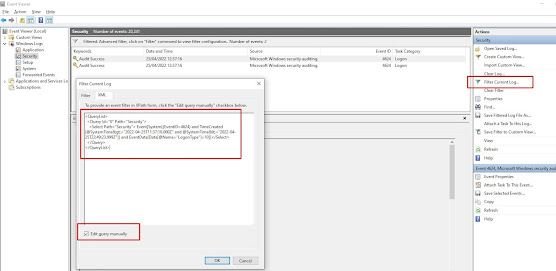
Use the following powershell script to find the last users to login to a box since a given date, in this case the 21st April 2022 at 12pm un...