rd /s %systemdrive%\$Recycle.binprotected override void OnStart(string[] args)
{
#if DEBUG
// If the "WaitForDebugger" argument is passed, wait for 15 seconds for a debugger to become attached.
if (args.OfType<string>().Contains("WaitForDebugger"))
{
for (var i = 1; i <= 15; i++)
{
if (Debugger.IsAttached)
{
break;
}
Thread.Sleep(1000);
}
// If no debugger is attached, abort attempt to start service.
if (!Debugger.IsAttached)
{
Stop();
return;
}
}
#endif2. The vCmd script, this automates the starting of the service if it is not started, and then the connection of the debugger to the process.
First ensure that you have set up the backlog iteration, to be one above the iteration path for your sprint items, and then check the items for your sprint iteration here
http://tfs.com:8080/tfs/DefaultCollection/TeamProjectName/_admin/_iterations
Then use this link to get to the task board
http://tfs.com:8080/tfs/DefaultCollection/TeamProjectName/_backlogs/TaskBoard/#_a=requirements
This works fine…
tfpt unshelve /migrate /source:$/MyProject/Fb3.9.8 /target:$/MyProject/Main
But put quotes round and it does NOT work
tfpt unshelve /migrate /source:"$/MyProject/Fb3.9.8" /target:"$/MyProject/Main"
Further information can be found here…
Finding the contact us link on amazon is like trying to find a needle in a haystack these days.
Finally located it properly, rather than googling “amazon online chat” as I have done in the past…
<#
.Synopsis
Write-XmlPathOutput processes all files in a directory for a given XPath expression and puts the results to .txt files of the same name
.EXAMPLE
Write-XmlPathOutput -DirectoryPath DirectoryPath -XPath //*/project
.INPUTS
DirectoryPath - the path to the directory
XPath - the xpath you wish to use
.OUTPUTS
.txt text files in the same directory
#>
function Write-XmlPathOutput
{
[CmdletBinding(DefaultParameterSetName='Parameter Set 1',
SupportsShouldProcess=$false,
PositionalBinding=$false,
HelpUri = 'http://merrickchaffer.blogspot.com/',
ConfirmImpact='Medium')]
[OutputType([String])]
Param
(
# Param1 help description
[Parameter(Mandatory=$true,
ValueFromPipeline=$true,
ValueFromPipelineByPropertyName=$true,
ValueFromRemainingArguments=$false,
Position=0,
ParameterSetName='Parameter Set 1')]
[ValidateNotNull()]
[Alias("p")]
[String]
$DirectoryPath = (Get-Location).Path,
# xpath help description
[Parameter(Mandatory=$false, ParameterSetName='Parameter Set 1', Position=1,
ValueFromPipeline=$true,
ValueFromPipelineByPropertyName=$true,
ValueFromRemainingArguments=$false )]
[Alias("x")]
[String]
$XPath = "//*/project/@file"
)
Begin
{
}
Process
{
if ($pscmdlet.ShouldProcess("Target", "Operation"))
{
$files = Get-ChildItem (Get-ChildItem $DirectoryPath\*.xml)
if ($files -ne $null -and $files.Length -gt 0) {
ForEach ($file in $files) {
$OutFile = [string]::Concat($file.FullName, ".txt")
Select-Xml -Path $file.FullName -XPath $XPath | Select -ExpandProperty Node | Out-File $OutFile
}
}
}
}
End
{
}
}
Write-XmlPathOutput -DirectoryPath C:\temp -XPath "//*/project/@file"

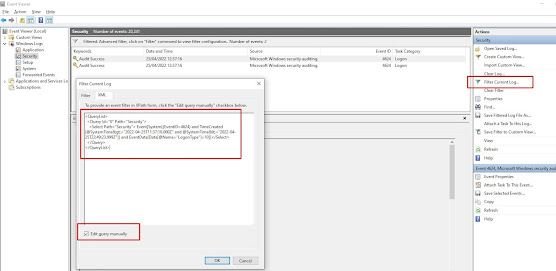
Use the following powershell script to find the last users to login to a box since a given date, in this case the 21st April 2022 at 12pm un...