A little cheat sheet for how to do things with Ninject that made implementing super-simple:
http://lukewickstead.wordpress.com/2013/01/18/ninject-cheat-sheet/
A little cheat sheet for how to do things with Ninject that made implementing super-simple:
http://lukewickstead.wordpress.com/2013/01/18/ninject-cheat-sheet/
Use the following script
USE [master]
SET NOCOUNT ON;
-- Create a temp table to hold orphaned accounts
if OBJECT_ID('tempdb..#Orphans') is not NULL DROP TABLE #Orphans
CREATE TABLE #Orphans (
ID INT NOT NULL IDENTITY,
DBName NVARCHAR(MAX) DEFAULT NULL,
Username NVARCHAR(MAX),
userSID NVARCHAR(MAX)
)
-- For each database get orphaned accounts
EXEC sp_MSforeachdb 'use [?]; insert into #Orphans (Username,UserSID) EXEC sp_change_users_login ''REPORT''; update #Orphans SET dbname = ''?'' where dbname is NULL'
-- Remove DBs that are not ONLINE or that are READ_ONLY as we can't alter them.
DELETE FROM #Orphans WHERE NOT [DBName] IN
(
SELECT name
FROM sys.databases
WHERE state_desc = 'ONLINE' AND is_read_only = 0 -- Databases that are ONLINE and NOT Read_Only
)
-- Loop through all remaining orphans and attempt to un-orphan them
DECLARE @CurRow INT = 1
DECLARE @EndRow INT = (SELECT MAX(ID) FROM #Orphans)
DECLARE @SQLCmd NVARCHAR(MAX)
WHILE @CurRow <= @EndRow
BEGIN
SET @SQLCmd = (SELECT 'USE [' + DBName + ']; EXEC sp_change_users_login ''UPDATE_ONE'', ''' + Username + ''', ''' + username + ''';' FROM #Orphans WHERE ID = @CurRow)
SET @CurRow = @CurRow + 1
PRINT @SQLCmd
EXECUTE (@SQLCmd) -- re associate the login with the user account
END
-- Drop temp table holding orphaned accounts
if OBJECT_ID('tempdb..#Orphans') is not NULL DROP TABLE #Orphans
In SQL Server management studio, using, View, Registered Servers (Ctrl+Alt+G) set up the servers that you want to execute the same query across all servers for, right click the group, select new query. Then when you execute the query, the results will come back with the first column showing you the database instance that that row came from.
Use the following link to see what kind of activity is taking place on Stack Overflow for your favourite language or topic of choice.
http://hewgill.com/~greg/stackoverflow/stack_overflow/tags/#!c%23+java+f%23+html+c
Quite simply, use the PageName property.
For more information on how to do this using expressions for each page group, see here...
http://blogs.msdn.com/b/robertbruckner/archive/2010/05/16/report-design-naming-excel-worksheets.aspx
Two methods
1. Start, Run..., cmd.exe, systeminfo.exe, then search for system manufacturer, and if virtual it will be listed as follows :-
If this is a VMware virtual machine, result should be:
System Manufacturer: VMware, Inc.
System Model: VMware Virtual Platform
If this is a Hyper V or a Microsoft Virtual PC machine the result should be like this:
System Manufacturer: Microsoft Corporation
System Model: Virtual Machine
2. Start, Run..., msinfo32.exe - basically a graphical user interface showing much the same information as you get from method 1.
SET UP a Linked server with name ADSI to make this work (shown below)
Also further on you'll see the use of the userAccountControl field, which is a flags field that stores user account details. The list of which flags are which can be found here...
http://msdn.microsoft.com/en-us/library/windows/desktop/ms680832(v=vs.85).aspx
use [utilities]
SET NOCOUNT ON;
-- Ensure database link to AD called ADSI exists...
IF object_id('[Utilities].[dbo].[AccountSyncCheck]') IS NOT NULL DROP TABLE [dbo].[AccountSyncCheck]
CREATE TABLE [dbo].[AccountSyncCheck](
[LOGINID] [varchar](100) collate database_default NOT NULL,
[EMAILADDRESS] [varchar](255) collate database_default NULL,
[EMPLOYEEID] [varchar](10) collate database_default NULL,
[FIRSTNAME] [varchar](255) collate database_default NULL,
[LASTNAME] [varchar](255) collate database_default NULL,
[DEPARTMENT] [varchar](255) collate database_default NULL,
[OFFICENAME] [varchar](255) collate database_default NULL,
[DISPLAYNAME] [varchar](255) collate database_default NULL,
userAccountControl int,
CONSTRAINT [PK_AccountSyncCheck_LOGINID] PRIMARY KEY CLUSTERED
(
[LOGINID] ASC
)WITH (IGNORE_DUP_KEY = OFF) ON [PRIMARY]
) ON [PRIMARY]
GO
IF object_id('tempdb..#temp') IS NOT NULL DROP TABLE #temp;
CREATE TABLE #Temp
(
samaccountname VARCHAR (100) ,
givenname VARCHAR (255) NULL,
sn VARCHAR (255) NULL,
mail VARCHAR (255) NULL,
department VARCHAR (255) NULL,
physicalDeliveryOfficeName NVARCHAR (255) NULL,
employeeid VARCHAR (15) NULL,
displayname VARCHAR (255) NULL,
userAccountControl int null
);
DECLARE @sql AS VARCHAR (MAX)
DECLARE @i AS INT = ASCII('A');
WHILE @i <= ASCII('Z')
BEGIN
SET @sql = 'SELECT samaccountname, givenname, sn, mail, department, physicalDeliveryOfficeName,employeeid,displayname,userAccountControl
FROM OPENQUERY( ADSI,
''SELECT samaccountname, givenname, sn, mail, department, physicalDeliveryOfficeName,employeeid,displayname,userAccountControl
FROM ''''LDAP://dc=mydomain,dc=com''''
WHERE objectCategory = ''''Person'''' AND objectClass= ''''user''''
AND userprincipalname = ''''*'''' AND mail = ''''*'''' AND SN = ''''*''''
AND samaccountname >= '''' ' + char(@i) + ' '''' and samaccountname < '''' ' + char(@i + 1) + ' ''''
'') ';
PRINT @SQL
INSERT INTO #Temp
EXECUTE (@sql);
SET @i = @i + 1;
END
-- deal with oddball characters
SET @sql = 'SELECT samaccountname, givenname, sn, mail, department, physicalDeliveryOfficeName,employeeid,displayname,userAccountControl
FROM OPENQUERY( ADSI,
''SELECT samaccountname, givenname, sn, mail, department, physicalDeliveryOfficeName,employeeid,displayname ,userAccountControl
FROM ''''LDAP://dc=mydomain,dc=com''''
WHERE objectCategory = ''''Person'''' AND objectClass= ''''user''''
AND userprincipalname = ''''*'''' AND mail = ''''*'''' AND SN = ''''*''''
AND samaccountname < ''''A''''
'') ';
INSERT INTO #Temp
EXECUTE (@sql);
SET @sql = 'SELECT samaccountname, givenname, sn, mail, department, physicalDeliveryOfficeName,employeeid,displayname,userAccountControl
FROM OPENQUERY( ADSI,
''SELECT samaccountname, givenname, sn, mail, department, physicalDeliveryOfficeName,employeeid,displayname,userAccountControl
FROM ''''LDAP://dc=mydomain,dc=com''''
WHERE objectCategory = ''''Person'''' AND objectClass= ''''user''''
AND userprincipalname = ''''*'''' AND mail = ''''*'''' AND SN = ''''*''''
AND samaccountname >= ''''ZZZZZZZ''''
'') ';
INSERT INTO #Temp
EXECUTE (@sql);
IF (SELECT COUNT(*)
FROM #Temp) > 0
BEGIN
truncate table AccountSyncCheck
INSERT INTO AccountSyncCheck (LOGINID,EMAILADDRESS,EMPLOYEEID,FIRSTNAME,LASTNAME,DEPARTMENT,OFFICENAME,DISPLAYNAME, userAccountControl)
SELECT samaccountname,
mail,
LEFT(employeeid, 10),
givenname,
sn,
department,
physicalDeliveryOfficeName,
displayname,
userAccountControl
FROM #Temp
ORDER BY samaccountname;
END
SET NOCOUNT OFF;
--select top 10 * from beacon.dbo.rraperson
select *
from utilities.dbo.AccountSyncCheck
/*
SELECT
'active RRA person(s) with invalid email address' AS alert,
iv.PersonID, InternetAddress, Preferred, OfficeID, Loginname, Active, Responsibility, RetiredDate
from beacon.dbo.IV_PersonInternetAddressCompletePreferred iv
inner join beacon.dbo.rraperson r on r.personid = iv.personid
where ISNULL(iv.internetaddress, '') <> ''
--and iv.internetaddress not like '%@mydomain.com%' and iv.internetaddress not like '%@russreyn.com%'
and active = 1
and iv.personid not in (10000165,40002053,900008913,40001263,40001285)
*/
-- Active in Beacon disabled in AD
select *
from utilities.dbo.AccountSyncCheck
-- find active where they should be inactive
select *
from AccountSyncCheck b
inner join beacon.dbo.rrapersonsummary r on r.loginname = 'mydomain\' + b.loginid
where r.Active = 1
and useraccountcontrol & 2 = 2
-- find beacon spelling mistakes in email addresses
select b.loginid, pcp.PersonID, ActiveDirectoryEmailAddress = b.emailaddress, BeaconEmailAddress = pcp.InternetAddress
from AccountSyncCheck b
inner join beacon.dbo.rrapersonsummary r on r.loginname = 'mydonamin\' + b.loginid
inner join Beacon.dbo.IV_PersonInternetAddressCompletePreferred pcp on pcp.PersonID = r.id
where pcp.InternetAddress <> b.emailaddress
and r.Active = 1
and useraccountcontrol & 2 = 0
In case it happens to you..
I uninstalled both .NET 4.5.1 security updates
KB 2901126 and KB 2898869, restarted and now machine is fixed.

More on this issue here
From here...
It's easy to connect to WiFi on the London Underground.
If you're an active EE, T-Mobile or Orange mobile customer then just text EEWIFI to 9527 and we’ll send you a password to access the service when you next go on the Underground.
Once you’re underground in a participating station, just follow these simple steps to connect:
1. On your device, turn WiFi on
2. Select Virgin Media WiFi from the list of available networks
3. Open your web browser and follow the prompts on the Virgin Media portal
4. Select EE and register using your mobile phone number and the password that we sent to you by text
Once you’ve connected to the WiFi once, you’ll automatically connect every time you enter a WiFi enabled station (as long as WiFi is switched on on your device).
See this video on line for how to take it apart (no more difficult than dismantling a PC really)
https://www.youtube.com/watch?v=5GoJWS_1hmw
Then just use an old toothbrush to clean the chrome spiral that helps the laser up and down the runner, and use a cotton bud dipped in some ethanol (or any alcohol solution), to clean the laser head itself.
Blow out any dust you can see internally, and put it back together.
Did this with our decade old device last weekend, and now the machine is working better than it did when we originally bought it!
Open the registry editor and go to HKEY_CURRENT_USER\Software\Microsoft\VisualStudio\11.0\General\
(For Windows 8 Desktop Express go to HKCU\Software\Microsoft\WDExpress\11.0\General) //special thanks to msm8bball for the update
(For Web Express go to HKEY_CURRENT_USER\Software\Microsoft\VSWDExpress\11.0\General)
NOTE: Watch your spelling if you are typing this manually.
P.S. This reg hack also works for VS 2013, just change the 11.0 to 12.0 in the registry path
HKEY_CURRENT_USER\Software\Microsoft\VisualStudio\12.0\General
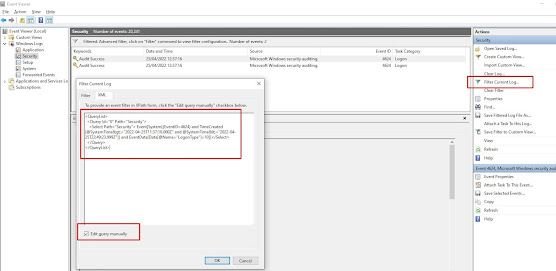
Use the following powershell script to find the last users to login to a box since a given date, in this case the 21st April 2022 at 12pm un...


![clip_image002[4]](https://blogger.googleusercontent.com/img/b/R29vZ2xl/AVvXsEhh0r6g6hcGu-UUWYqC-nr4V9I_eWgCFvdwqrtDGtp5dDMIjhPTovAV0NKnoeX9HVAlZTkiVoj-IrV5m_vumsWvXQzbApA0PEFqKIQLr1WgqBAaFcI66G-pgIvbwQ9hICtZW6cXhJI52kw/s1600-h/clip_image002%25255B4%25255D%25255B2%25255D.jpg "clip_image002[4]")
![clip_image002[6]](https://blogger.googleusercontent.com/img/b/R29vZ2xl/AVvXsEiIIsYFtdhyphenhyphennzVjZrhcfksaQ166sZvKI1534dP8GhV6Z55PJTUfzeeBT7l7bYTpF5QKx_pmikWRoQOrLV1VV6p-jOtxQIPHA9CBDU-6LNf_VaRrC8BkeLKKm4m3VEAAjIasNV-s8YL3tws/s1600-h/clip_image002%25255B6%25255D%25255B2%25255D.jpg "clip_image002[6]")
