Friday, 27 December 2013

How to solve the Rubik's cube

My kids got rubik's cubes for christmas this year, and the first thing I wanted to do was solve it for myself. I remember when I was a child, only being able to solve one face of the cube, and in the age of youtube I thought there may be a training video out there to show my how to solve all three levels of the cube. Sure enough a quick type into youtube search engine for Rubik's cube brought up these two great training videos.

Full solution

http://www.youtube.com/watch?v=MaltgJGz-dU

3rd level codes

http://www.youtube.com/watch?annotation_id=annotation_624964&feature=iv&src_vid=MaltgJGz-dU&v=05vEFHBO9SU

For my reference I wrote down the codes for the 3rd level as follows

rubiks

Wednesday, 18 December 2013

SQL Server Report Server Investigations

The following SQL will let you find the worst performing reports, and also the ones that error on your reporting services database instance.


SELECT C.Path,
    C.Name

          , E.Requesttype
           --WHEN 1 THEN 'Subscription'
           --WHEN 0 THEN 'Report Launch'
           --ELSE ''
           --END
          ,E.TimeStart
          ,E.TimeProcessing
          ,E.TimeRendering
          ,E.TimeEnd
          ,[TimeTotal (ms)] = DATEDIFF ( millisecond , E.TimeStart , E.TimeEnd )
          ,E.Status
          ,E.InstanceName
          ,E.UserName
     FROM Reportserver.dbo.ExecutionLog E (NOLOCK)
     INNER JOIN Reportserver.dbo.Catalog C (NOLOCK)
       ON E.ReportID = C.ItemID
WHERE 1=1
--    WHERE C.Name = 'Project Full Control Comments'
and E.Requesttype = 0
and E.Status <> 'rsSuccess'

ORDER BY [TimeTotal (ms)] DESC

Wednesday, 11 December 2013

Altering the HTTP response using Fiddler

Should you ever have the need to change the http response to a web server, then please note in the latest version of Fiddler it's actually possible to do this without having to hack the CustomRules.js file that the Fiddler training videos and documentation tell you about.

You can simply set up an AutoResponder tab rule as follows

1. Stick a file in %userprofile%\Documents\Fiddler2\Captures\Responses folder

2. Highlight the request you want to set up a rule for

3. Got to the AutoResponder tab and check Enable automatic responses and unmagtched requests passthrough

4. Click Add rule

5. In the dropdown list control at the bottom, select the file that you dropped in the folder in step 1 above.

6. Hit the save button

7. Clear the Cache

clip_image001

Now next time you request that resource, the version you have saved on disk will be downloaded instead. You can check this by looking in the IE cache folder %userprofile

%userprofile%\AppData\Local\Microsoft\Windows\Temporary Internet Files

More detail about request and response breakpoints in fiddler here… (this is very useful should you wish to change the request going to the server in the first place as well)…

http://www.youtube.com/watch?v=8bo5kXMAcV0&list=PLvmaC-XMqeBbw72l2G7FG7CntDTErjbHc&index=2

P.S. For more powerful / permanent debugging solution you can just alter the fiddler customrules.js as follows

static function OnBeforeResponse(oSession: Session) {

        if (m_Hide304s && oSession.responseCode == 304) {

            oSession["ui-hide"] = "true";

        }

if (oSession.uriContains("Name=ViewerScript")) {

                                                oSession["x-replywithfile"]="Reserved.ReportViewerWebControl.axd";

                                }

    }

Monday, 9 December 2013

Using the DataContractSerializer to serialize and deserialize


To serialize a Business object marked with [DataContract] and properties marked with [DataMember] attributes…

public static string DataContractSerializeObject<T>(T objectToSerialize)

        {

using (var output = new StringWriter())

            {

using (var writer = new XmlTextWriter(output) { Formatting = Formatting.Indented })

                {

var dataContractSerializer = new DataContractSerializer(typeof(T), EntityUtilities.GetAllKnownTypes(), int.MaxValue, true, true, null);

                    dataContractSerializer.WriteObject(writer, objectToSerialize);

return output.GetStringBuilder().ToString();

                }

            }

        }

Then to deserialize back to your DataContract type, use this logic…

public static T Deserialize<T>(string xml)

        {

using (Stream stream = new MemoryStream())

            {

byte[] data = System.Text.Encoding.UTF8.GetBytes(xml);

                stream.Write(data, 0, data.Length);

                stream.Position = 0;

var dataContractSerializer = new DataContractSerializer(typeof(T), EntityUtilities.GetAllKnownTypes(), int.MaxValue, true, true, null);

return (T)dataContractSerializer.ReadObject(stream);

            }

        }

Thursday, 5 December 2013

Cross platform mobile development in C#

http://blog.xamarin.com/microsoft-and-xamarin-partner-globally/

Microsoft Virtual Academy - ASP.NET MVC

I’ve just got into the Microsoft Virtual Academy, and I have to say it has a wealth of up to date, excellent training videos.

http://www.microsoftvirtualacademy.com/Content/ViewContent.aspx?et=4099&m=4093&ct=19601#?fbid=_Oyn-vcRqgr

Razor syntax escape characters…

image

Html anti forgery token..

http://blog.stevensanderson.com/2008/09/01/prevent-cross-site-request-forgery-csrf-using-aspnet-mvcs-antiforgerytoken-helper/

ASP.NET MVC 4 Content Map

http://www.asp.net/mvc/overview/getting-started/aspnet-mvc-content-map

Script including - always use the longhand version for the <script></script> tag, otherwise your script file will not be downloading to the client browser

JSBin.com - http://jsbin.com/ a fantastic javscript, jquery, html and css online playground like jsfiddle.net and plnkr.co. The nice thing about this one though is that you can download the entire finished article file as a single html page.

What's coming in ASP.NET - www.asp.net/vnext

Signed nightly builds of asp.net vnext - https://aspnetwebstack.codeplex.com/

Getting started with web api - http://www.asp.net/web-api/overview/getting-started-with-aspnet-web-api/tutorial-your-first-web-api

Web API 2 (video) - http://channel9.msdn.com/Events/Build/2013/3-504

Wednesday, 23 October 2013

Windows 8.1 USB installer and dual booting

Looks like Microsoft make the task dead simple for you now…

http://www.neowin.net/news/here-is-how-to-get-the-windows-81-iso-and-create-a-usb-install-stick

Although if you get into the trouble I had with GPT bios issues, then use this trick instead…

http://techverse.net/how-to-create-bootable-usb-flash-drive-install-windows-8-1/

Also for all you need to know about dual booting between various flavours of Windows see here

http://www.pagestart.com/dualbootkorner.html

EaseUS Backup Free here (for system imaging backups)

http://download.easeus.com/free/tb_free_installer.exe

MyDefrag defragger to move MBT here

http://www.mydefrag.com/Manual-DownloadAndInstall.html

Thursday, 17 October 2013

No Cache Attribute in MVC

    using System;
using System.Web;
using System.Web.Mvc;
using RRA.Core.Services.Utilities;

///
/// Disables browser caching.
///

[AttributeUsage(AttributeTargets.Method)]
public class NoCacheAttribute : ActionFilterAttribute
{
///
/// Called by the ASP.NET MVC framework before the action result executes.
///

/// The filter context.
public override void OnResultExecuting(ResultExecutingContext filterContext)
{
filterContext.HttpContext.Response.Cache.SetETag((Guid.NewGuid()).ToString());
filterContext.HttpContext.Response.Cache.SetExpires(SystemDateTime.UtcNow.AddDays(-1));
filterContext.HttpContext.Response.Cache.SetValidUntilExpires(false);
filterContext.HttpContext.Response.Cache.SetRevalidation(HttpCacheRevalidation.AllCaches);
filterContext.HttpContext.Response.Cache.SetCacheability(HttpCacheability.NoCache);
filterContext.HttpContext.Response.Cache.SetNoStore();
base.OnResultExecuting(filterContext);
}
}


Tuesday, 15 October 2013

My VS macros

Imports System
Imports EnvDTE
Imports EnvDTE80
Imports EnvDTE90
Imports EnvDTE90a
Imports EnvDTE100
Imports System.Diagnostics
Public Module Module1
    'Empty routine that just causes VS to flush its memory to disk
    Sub ReleaseMemory()
    End Sub
    Sub RebuildDocumentationUpwards()
        DTE.ExecuteCommand("ReSharper.ReSharper_GotoPrevMethod")
        DTE.ExecuteCommand("Tools.SubMain.GhostDoc.RebuildDocumentation")
    End Sub
    Sub AttachToW3p()
        AttachToProcess("w3wp.exe")
    End Sub
    Sub AttachToLocalWebDev()
        AttachToProcess("WebDev.WebServer40.EXE")
    End Sub
    Sub AttachToMyProcess()
        AttachToProcess("MyProcess.exe")
    End Sub
    Sub AttachToMyProcessScript()
        AttachToProcess("MyProcess.exe", True)
    End Sub
    Private Sub AttachToProcess(ByVal ProcessName As String, Optional ByVal ScriptOnly As Boolean = False)
        Try
            Dim dbg2 As EnvDTE80.Debugger2 = DTE.Debugger
            Dim trans As EnvDTE80.Transport = dbg2.Transports.Item("Default")
            Dim dbgeng(2) As EnvDTE80.Engine
            dbgeng(0) = trans.Engines.Item("Script")
            If ScriptOnly Then
                Array.Resize(dbgeng, 1)
            Else
                dbgeng(1) = trans.Engines.Item("Managed")
            End If
            Dim proc2 As EnvDTE80.Process2 = dbg2.GetProcesses(trans, System.Environment.MachineName).Item(ProcessName)
            Call proc2.Attach2(dbgeng)
        Catch ex As System.Runtime.InteropServices.COMException
            Select Case ex.ErrorCode
                Case -2147352565
                    ShowMessage(ProcessName & " is not currently a running process")
                Case -1989083106
                    ShowMessage("You are already attached to " & ProcessName)
                Case Else
                    ShowMessage("Unhandled error message from Attach to process macro")
            End Select
        Catch ex As System.Exception
            MsgBox("Unhandled exception occurred: " & ex.Message)
        End Try
    End Sub
    Private Sub ShowMessage(ByVal message As String)
        Call MsgBox(message, MsgBoxStyle.Exclamation, "Attach to process macro")
    End Sub
End Module

Wednesday, 9 October 2013

GOTCHA: The resurrection of TFS source control folders

Today we found something very interesting with Team Foundation Server (TFS) source control folder workflow. A colleague of mine had deleted a source control folder from TFS source control, but as I hadn't got latest on the parent folder, I was not aware that he had done this.

I was then able to add a script to this deleted folder, check in my change, and this had the implicit effect of undeleting the folder that my colleague wanted removed.

One to watch out for in case you don't always do a full get latest from the route of your source control project.

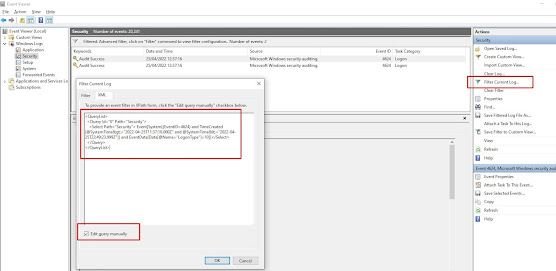
How to find the last interactive logons in Windows using PowerShell

Use the following powershell script to find the last users to login to a box since a given date, in this case the 21st April 2022 at 12pm un...