- Get a replacement battery from Casio UK on 020 8450 9131 https://support.casio.co.uk/Telephone.aspx
- Follow steps here on how to replace it (be careful not to loose the spring). http://forums.watchuseek.com/f43/how-change-ctl1616-rechargeable-battery-41076.html
Monday, 4 November 2013
How to replace the battery on a Casio MTG-900DU solar powered watch

Wednesday, 23 October 2013
Windows 8.1 USB installer and dual booting
Looks like Microsoft make the task dead simple for you now…
http://www.neowin.net/news/here-is-how-to-get-the-windows-81-iso-and-create-a-usb-install-stick
Although if you get into the trouble I had with GPT bios issues, then use this trick instead…
http://techverse.net/how-to-create-bootable-usb-flash-drive-install-windows-8-1/
Also for all you need to know about dual booting between various flavours of Windows see here
http://www.pagestart.com/dualbootkorner.html
EaseUS Backup Free here (for system imaging backups)
http://download.easeus.com/free/tb_free_installer.exe
MyDefrag defragger to move MBT here
Thursday, 17 October 2013
No Cache Attribute in MVC
    using System;
    using System.Web;
    using System.Web.Mvc;
    using RRA.Core.Services.Utilities;

    ///
    /// Disables browser caching.
    ///
    [AttributeUsage(AttributeTargets.Method)]
    public class NoCacheAttribute : ActionFilterAttribute
    {
        ///
        /// Called by the ASP.NET MVC framework before the action result executes.
        ///
        /// The filter context.
        public override void OnResultExecuting(ResultExecutingContext filterContext)
        {
            filterContext.HttpContext.Response.Cache.SetETag((Guid.NewGuid()).ToString());
            filterContext.HttpContext.Response.Cache.SetExpires(SystemDateTime.UtcNow.AddDays(-1));
            filterContext.HttpContext.Response.Cache.SetValidUntilExpires(false);
            filterContext.HttpContext.Response.Cache.SetRevalidation(HttpCacheRevalidation.AllCaches);
            filterContext.HttpContext.Response.Cache.SetCacheability(HttpCacheability.NoCache);
            filterContext.HttpContext.Response.Cache.SetNoStore();
            base.OnResultExecuting(filterContext);
        }
    }
Tuesday, 15 October 2013
My VS macros
Imports System
Imports EnvDTE
Imports EnvDTE80
Imports EnvDTE90
Imports EnvDTE90a
Imports EnvDTE100
Imports System.Diagnostics
Public Module Module1
'Empty routine that just causes VS to flush its memory to disk
Sub ReleaseMemory()
End Sub
Sub RebuildDocumentationUpwards()
DTE.ExecuteCommand("ReSharper.ReSharper_GotoPrevMethod")
DTE.ExecuteCommand("Tools.SubMain.GhostDoc.RebuildDocumentation")
End Sub
Sub AttachToW3p()
AttachToProcess("w3wp.exe")
End Sub
Sub AttachToLocalWebDev()
AttachToProcess("WebDev.WebServer40.EXE")
End Sub
Sub AttachToMyProcess()
AttachToProcess("MyProcess.exe")
End Sub
Sub AttachToMyProcessScript()
AttachToProcess("MyProcess.exe", True)
End Sub
Private Sub AttachToProcess(ByVal ProcessName As String, Optional ByVal ScriptOnly As Boolean = False)
Try
Dim dbg2 As EnvDTE80.Debugger2 = DTE.Debugger
Dim trans As EnvDTE80.Transport = dbg2.Transports.Item("Default")
Dim dbgeng(2) As EnvDTE80.Engine
dbgeng(0) = trans.Engines.Item("Script")
If ScriptOnly Then
Array.Resize(dbgeng, 1)
Else
dbgeng(1) = trans.Engines.Item("Managed")
End If
Dim proc2 As EnvDTE80.Process2 = dbg2.GetProcesses(trans, System.Environment.MachineName).Item(ProcessName)
Call proc2.Attach2(dbgeng)
Catch ex As System.Runtime.InteropServices.COMException
Select Case ex.ErrorCode
Case -2147352565
ShowMessage(ProcessName & " is not currently a running process")
Case -1989083106
ShowMessage("You are already attached to " & ProcessName)
Case Else
ShowMessage("Unhandled error message from Attach to process macro")
End Select
Catch ex As System.Exception
MsgBox("Unhandled exception occurred: " & ex.Message)
End Try
End Sub
Private Sub ShowMessage(ByVal message As String)
Call MsgBox(message, MsgBoxStyle.Exclamation, "Attach to process macro")
End Sub
End Module
Imports EnvDTE
Imports EnvDTE80
Imports EnvDTE90
Imports EnvDTE90a
Imports EnvDTE100
Imports System.Diagnostics
Public Module Module1
'Empty routine that just causes VS to flush its memory to disk
Sub ReleaseMemory()
End Sub
Sub RebuildDocumentationUpwards()
DTE.ExecuteCommand("ReSharper.ReSharper_GotoPrevMethod")
DTE.ExecuteCommand("Tools.SubMain.GhostDoc.RebuildDocumentation")
End Sub
Sub AttachToW3p()
AttachToProcess("w3wp.exe")
End Sub
Sub AttachToLocalWebDev()
AttachToProcess("WebDev.WebServer40.EXE")
End Sub
Sub AttachToMyProcess()
AttachToProcess("MyProcess.exe")
End Sub
Sub AttachToMyProcessScript()
AttachToProcess("MyProcess.exe", True)
End Sub
Private Sub AttachToProcess(ByVal ProcessName As String, Optional ByVal ScriptOnly As Boolean = False)
Try
Dim dbg2 As EnvDTE80.Debugger2 = DTE.Debugger
Dim trans As EnvDTE80.Transport = dbg2.Transports.Item("Default")
Dim dbgeng(2) As EnvDTE80.Engine
dbgeng(0) = trans.Engines.Item("Script")
If ScriptOnly Then
Array.Resize(dbgeng, 1)
Else
dbgeng(1) = trans.Engines.Item("Managed")
End If
Dim proc2 As EnvDTE80.Process2 = dbg2.GetProcesses(trans, System.Environment.MachineName).Item(ProcessName)
Call proc2.Attach2(dbgeng)
Catch ex As System.Runtime.InteropServices.COMException
Select Case ex.ErrorCode
Case -2147352565
ShowMessage(ProcessName & " is not currently a running process")
Case -1989083106
ShowMessage("You are already attached to " & ProcessName)
Case Else
ShowMessage("Unhandled error message from Attach to process macro")
End Select
Catch ex As System.Exception
MsgBox("Unhandled exception occurred: " & ex.Message)
End Try
End Sub
Private Sub ShowMessage(ByVal message As String)
Call MsgBox(message, MsgBoxStyle.Exclamation, "Attach to process macro")
End Sub
End Module
Wednesday, 9 October 2013
GOTCHA: The resurrection of TFS source control folders
Today we found something very interesting with Team Foundation Server (TFS) source control folder workflow. A colleague of mine had deleted a source control folder from TFS source control, but as I hadn't got latest on the parent folder, I was not aware that he had done this.
I was then able to add a script to this deleted folder, check in my change, and this had the implicit effect of undeleting the folder that my colleague wanted removed.
One to watch out for in case you don't always do a full get latest from the route of your source control project.
Wednesday, 18 September 2013
Preload Images with CSS, Javascript or Ajax
See here for many ways to achieve this...
http://perishablepress.com/3-ways-preload-images-css-javascript-ajax/
Personally I'm sticking with the following...
http://jsfiddle.net/chafferm/VU2dq/
Note the type check for array in this example is probably overkill, as it is for all browser versions, we could have used jQuery isArray instead, or even Array.isArray in ECMA script 5 (IE 9 or higher).
Wednesday, 28 August 2013
How to put back AirDroid 2.0.3 on Galaxy S2
- Force stop
- Move it to SD Card
- Uninstall
Then download the .apk from another device that's running the old 2.0.3 version, using airdroid against that device, apps, download button, and then install that on your Galaxy S2 again.
or just use the one here
https://docs.google.com/file/d/0B2APGSXHNH_bbXVnWmhsOXpIWk0/edit?usp=sharing
All is good in the world again.
Note: The direct browser link to airdroid version 2.0.3 is now
Saturday, 24 August 2013
Plunkr Noughts And Crosses Game
Spent some time with my new favourite javascript online editor of the moment http://plunkr.co. I've found I can use my tablet, an iPad and even a smart phone to edit my HTML using this editor, although most of the time it's done using Google Chrome on a laptop.
My daughter and I find this game is best played with two wireless mouse devices plugged into the laptop, and you take it in turns to move the pieces into the squares.
P.S. Some hidden gems in Plunkr are the keyboard shortcuts:
Ctrl+S = Save
Ctrl+Up/ Ctrl+Down = Cycle through files
Ctrl+Enter = Preview / Run your code
To run the game, click here:
http://run.plnkr.co/plunks/kLcfW2/
To edit the code, feel free at this link:
http://plnkr.co/edit/kLcfW2?p=preview
My daughter and I find this game is best played with two wireless mouse devices plugged into the laptop, and you take it in turns to move the pieces into the squares.
P.S. Some hidden gems in Plunkr are the keyboard shortcuts:
Ctrl+S = Save
Ctrl+Up/ Ctrl+Down = Cycle through files
Ctrl+Enter = Preview / Run your code
To run the game, click here:
http://run.plnkr.co/plunks/kLcfW2/
To edit the code, feel free at this link:
http://plnkr.co/edit/kLcfW2?p=preview
 |
| Plunkr - Noughts and Crosses Game |
Wednesday, 31 July 2013
Tuesday, 23 July 2013
Unit of work pattern in WCF
See here for an example of how to implement a unit of work pattern in WCF (using Unity).
public class CustomServiceHostFactory : ServiceHostFactory
{
protected override ServiceHost CreateServiceHost(Type serviceType, Uri[] baseAddresses)
{
return new CustomServiceHost(serviceType, baseAddresses);
}
}
public class CustomServiceHost : ServiceHost
{
static IUnityContainer _container;
static CustomServiceHost()
{
_container = new UnityContainer();
_container.RegisterType<ICompanyRepository, CompanyRepository>();
_container.RegisterType<IUnitOfWork, DbUnitOfWork>();
_container.RegisterType<SVCContext>(new ServiceInstanceLifeTimeManager());
}
public CustomServiceHost(Type serviceType, params Uri[] : base(serviceType, baseAddresses)
{
}
protected override void ApplyConfiguration()
{
base.ApplyConfiguration();
Description.Behaviors.Add(_container.Resolve<UnityServiceBehavior>());
}
}
public class UnityServiceBehavior : BehaviorExtensionElement , IServiceBehavior
{
IUnityContainer _container;
public UnityServiceBehavior(IUnityContainer container) : base()
{
_container = container;
}
public void AddBindingParameters(ServiceDescription serviceDescription,
ServiceHostBase serviceHostBase,
Collection<ServiceEndpoint> endpoints,
BindingParameterCollection bindingParameters)
{
}
public void ApplyDispatchBehavior(ServiceDescription serviceDescription,
ServiceHostBase serviceHostBase)
{
Type serviceType = serviceDescription.ServiceType;
IInstanceProvider instanceProvider = new UnityInstanceProvider(_container, serviceType);
foreach (ChannelDispatcher dispatcher in serviceHostBase.ChannelDispatchers)
{
foreach (EndpointDispatcher endpointDispatcher in dispatcher.Endpoints)
{
endpointDispatcher.DispatchRuntime.InstanceProvider = instanceProvider;
endpointDispatcher.DispatchRuntime.MessageInspectors.Add(
new UnitOfWorkMessageInspector(_container)
);
}
}
}
public void Validate(ServiceDescription serviceDescription,
ServiceHostBase serviceHostBase)
{
}
public override Type BehaviorType
{
get { return this.GetType(); }
}
protected override object CreateBehavior()
{
return this;
}
}
public class UnityInstanceProvider : IInstanceProvider
{
IUnityContainer _container;
Type _serviceType;
public UnityInstanceProvider(IUnityContainer container, Type serviceType)
{
_container = container;
_serviceType = serviceType;
}
public object GetInstance(InstanceContext instanceContext, Message message)
{
return _container.Resolve(_serviceType);
}
public object GetInstance(InstanceContext instanceContext)
{
return this.GetInstance(instanceContext, null);
}
public void ReleaseInstance(InstanceContext instanceContext, object instance)
{
}
}
public interface IUnitOfWork
{
void Commit();
}
public class DbUnitOfWork : IUnitOfWork
{
SVCContext _context;
public DbUnitOfWork(SVCContext context)
{
_context = context;
}
public void Commit()
{
_context.SaveChanges();
}
}
public class UnitOfWorkMessageInspector : IDispatchMessageInspector
{
IUnityContainer _container;
public UnitOfWorkMessageInspector(IUnityContainer container)
{
_container = container;
}
public object AfterReceiveRequest(ref Message request, IClientChannel channel,
InstanceContext instanceContext)
{
return _container.Resolve<IUnitOfWork>();
}
public void BeforeSendReply(ref Message reply, object correlationState)
{
((IUnitOfWork)correlationState).Commit();
}
}
Friday, 24 May 2013
Icon editor for favicon in the web
Came across this in the book I'm reading at the moment, http://www.xiconeditor.com/ - rather clever little tool from Microsoft for creating the favicon for your website, for when users book mark it on their iPad / iPod or desktop PC.
Subscribe to:
Posts (Atom)
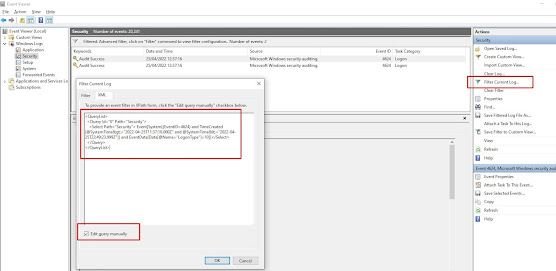
How to find the last interactive logons in Windows using PowerShell
Use the following powershell script to find the last users to login to a box since a given date, in this case the 21st April 2022 at 12pm un...
-
Quite by chance today I stumbled across a new way to learn Resharper shortcuts. In visual studio, when editing a file, tap the ctrl key thre...
-
http://www.jaguarforums.com/forum/s-type-s-type-r-supercharged-v8-15/key-fob-battery-replacement-write-up-faq-54380/ NOTE: MAKE SURE YOU DO ...

