Got this today on SQL 2008 R2. Work around was this one...
Right click database in management studio then click properties.
select "files" page
then set owner as "sa"
- Proposed As Answer by Jerome2606 Wednesday, January 11, 2012 11:46 AM
Got this today on SQL 2008 R2. Work around was this one...
Right click database in management studio then click properties.
select "files" page
then set owner as "sa"
Suffered from this today, and discovered that deleting the large > 350MB .suo file for the solution fixed the problem.
Turns out that if you use a lot of bookmarks, and break points this file can grow exponentially, as the file never appears to decrease in size, even after deleting old breakpoints and book marks, only keeps growing!
Baretail, showed that devenv.exe was just constantly writing out that same lines to the .suo file over and over again.
Have renamed the .suo file now, and VS appears to be working a little better. Not sure what project / solutions settings I will be missing though.
Also appears from Proc mon that it keeps trying to find the .suo file for the solution

However, VS is behaving fine for now, so going to keep on working like this.
More info about it here
There is however a work around that someone has listed on the community content section of this msdn post, on how to create a macro that will automatically delete the .suo file after the solution closes.
http://msdn.microsoft.com/en-us/library/bb165909.aspx
How to prevent the .suo file from being persisted.
It is possible to do this with macros that respond to the IDE's SolutionEvents.BeforeClosing and SolutionEvents.AfterClosing events.
Bam. No more persisted .suo files for any VS 2010 solutions. An absolute MUST if your 150-project solution takes 20+ minutes for C# IntelliSense to load.

Stick this in the Public Module EnvironmentEvents body...
Dim solutionName As String
Private Sub SolutionEvents_BeforeClosing() Handles SolutionEvents.BeforeClosing
solutionName = DTE.Solution.FullName
End Sub
Private Sub SolutionEvents_AfterClosing() Handles SolutionEvents.AfterClosing
Dim suoFilePath As String
suoFilePath = System.IO.Path.ChangeExtension(solutionName, "suo")
If Not System.IO.File.Exists(suoFilePath) Then
Return
End If
Dim fileInfo As System.IO.FileInfo = New IO.FileInfo(suoFilePath)
If fileInfo.Length > 3000000 Then '3MB file size would be quite large.
Dim response As MsgBoxResult
response = MsgBox("The solution user options file '" & suoFilePath + "' is " _
& fileInfo.Length.ToString() & _
" bytes large. Do you wish to delete this file in order to increase the performance of the solution?", MsgBoxStyle.YesNo + MsgBoxStyle.Question, _
"Delete solution user options file?")
If response = MsgBoxResult.Yes Then
System.IO.File.Delete(suoFilePath)
End If
End If
End Sub
Further to this, I've just been informed of this trick as well for speeding things up...
Another solution I’ve used in the past is to close Visual Studio, then clear the cache.
You would go to C:\Users\[user]\AppData\Local\Microsoft\Team Foundation\[version#]\Cache, and delete all contents. In older Windows versions, you would navigate to C:\Documents and Settings\[USER]\Local Settings\Application Data\Microsoft\Team Foundation\[Version#]\Cache, and delete all contents.
The first time you start VS after that will be a little slow, as it has to recreate the VersionControl settings, but after that you should see a big improvement.
http://www.scootersoftware.com/support.php?zz=kb_vcs#tfs
Diff
%1 %2 /title1=%6 /title2=%73-way Merge (v3 Pro)
%1 %2 %3 %4 /title1=%6 /title2=%7 /title3=%8 /title4=%92-way Merge (v3 Std, v2)
Use the same steps as the 3-way merge above, but use the command line:%1 %2 /savetarget=%4 /title1=%6 /title2=%7
I was watching perhaps the best training video I've ever watched on the weekend http://channel9.msdn.com/Events/MIX/MIX11/FRM09, and one of the libraries they were saying they can't live without is ELMAH (Error Logging Modules and Handlers) …
Also checkout Scott Hansleman coding from a dos prompt about 18 mins into the first video link… Class
Also worth noting that codeplex.com is based on a hybrid of both ASP.NET webforms and MVC.
Assuming you guys all have NuGet installed for VS 2010 extensions, then I can thoroughly recommend the MoodSwings package written by Phil Haack (mate of Scott H's).
To install, open the package manager console window, and simply type Install-Package MoodSwings
The command .. Set-Mood Rick will then provide you hours of fun ;)


Some great videos up here from the 2012 Microsoft tech days sessions in Belgium...
http://channel9.msdn.com/Events/TechDays/Techdays-2012-the-Netherlands
Say you have a row of data, and you want to lay it out vertically as a column instead, then you can simply select the row, copy it to the clipboard, and then using Microsoft Excel, from the paste special menu, select the Transpose option...
The following query will achieve this quite nicely.
SELECT
STUFF( (SELECT TOP 10
'; ' + COALESCE (Surname + ',' + Forename + ' ' + MiddleInitial , Surname + ',' + Forename, Surname)
FROM Person
FOR XML PATH('')),
1,
2,
'')
The important pieces of this query are that we're using the STUFF function to remove the starting '; ' from the resulting string, and also using FOR XML PATH('') to get the results of the inner SQL select into a single row result set instead of 10 rows.
Results come back in the format...
Surname1, Forename1; Surname2, Forename2; Surname3, Forename3
http://devlicio.us/blogs/anne_epstein/archive/2009/11/20/nhibernate-and-composite-keys.aspx
Create your identifier class...
[Serializable]
public class CategoryProductIdentifier {
public virtual int ProductId { get; set; }
public virtual int CategoryId { get; set; }
public override bool Equals(object obj)
{
if (obj == null)
return false;
var t = obj as CategoryProductIdentifier;
if (t == null)
return false;
if (ProductId == t.ProductId && CategoryId == t.CategoryId)
return true;
return false;
}
public override int GetHashCode()
{
return (ProductId + "|" + CategoryId).GetHashCode();
}
}
Update your existing class to make use of the identifier class
public class CategoryProduct
{
private CategoryProductIdentifier _categoryProductIdentifier = new CategoryProductIdentifier();
public virtual CategoryProductIdentifier CategoryProductIdentifier
{
get { return _categoryProductIdentifier; }
set { _categoryProductIdentifier = value; }
}
private Product _Product;
public virtual Product Product
{
get { return _Product; }
set { _Product = value;
_categoryProductIdentifier.ProductId = _Product.Id; }
}
private Category _Category;
public virtual Category Category
{
get { return _Category; }
set { _Category = value;
_categoryProductIdentifier.CategoryId = _Category.Id; }
}
public virtual string CustomizedProductDescription { get; set; }
}
Change your mapping to make use of the new <composite-id> mapping for the key
<hibernate-mapping>
<class name="CategoryProduct" table="CategoryProducts">
<composite-id name="CategoryProductIdentifier" class="CategoryProductIdentifier">
<key-property name="ProductId" column="ProductID" type="Int32" />
<key-property name="CategoryId" column="CategoryID" type="Int32" />
<version name="LastModifiedOn" type="timestamp" column="LastModifiedOn" />
</composite-id>
<many-to-one name="Product" column="ProductID" class="Product" insert="false" update="false" access="field.pascalcase-underscore" />
<many-to-one name="Category" column="CategoryID" class="Category" insert="false" update="false" access="field.pascalcase-underscore" />
<property name="CustomizedProductDescription" column="CustomizedProductDesc" />
</class>
</hibernate-mapping>
Just did this in the immediate window from break point set in Abstract Batcher, GetSQL method in the NHibernate source code

sql.ToString()
"exec [dbo].[GetProjectComments] ?"
SqlClientDriver driver= new SqlClientDriver();
SqlStringFormatter formatter = new SqlStringFormatter(driver);
sql.Visit(formatter)
Expression has been evaluated and has no value
formatter.GetFormattedText()
"exec [dbo].[GetProjectComments] @p0"
Thinking of using this to write a custom little app on the side to make all my SQL look nice again. I know SQL Prompt already does this nicely, but don't have a license for that right now, so this is a nice free alternative I guess.
http://www.intowindows.com/bootable-usb/
1. Insert your USB (4GB+ preferable) stick to the system and backup all the data from the USB as we are going to format the USB to make it as bootable.
2. Open elevated Command Prompt. To do this, type in CMD in Start menu search field and hit Ctrl + Shift + Enter. Alternatively, navigate to Start > All programs >Accessories > right click on Command Prompt and select run as administrator.
3. When the Command Prompt opens, enter the following command:
DISKPART and hit enter.
LIST DISK and hit enter.
Once you enter the LIST DISK command, it will show the disk number of your USB drive. In the below image my USB drive disk no is Disk 1.
4. In this step you need to enter all the below commands one by one and hit enter. As these commands are self explanatory, you can easily guess what these commands do.
SELECT DISK 1 (Replace DISK 1 with your disk number)
CLEAN
CREATE PARTITION PRIMARY
SELECT PARTITION 1
ACTIVE
FORMAT FS=NTFS
(Format process may take few seconds)
ASSIGN
EXIT

Don’t close the command prompt as we need to execute one more command at the next step. Just minimize it.
5. Insert your Windows DVD in the optical drive and note down the drive letter of the optical drive and USB media. Here I use “D” as my optical (DVD) drive letter and “H” as my USB drive letter.
6. Go back to command prompt and execute the following commands:
D:CD BOOT and hit enter. Where “D” is your DVD drive letter.
CD BOOT and hit enter to see the below message.
BOOTSECT.EXE/NT60 H:
(Where “H” is your USB drive letter)

7. Copy Windows DVD contents to USB.
You are done with your bootable USB. You can now use this bootable USB as bootable DVD on any computer that comes with USB boot feature (most of the current motherboards support this feature).
Note that this bootable USB guide will not work if you are trying to make a bootable USB on XP computer.
Today we found that one of our databases had mistakenly been dropped from our SQL server. To find out who you can use one of these two queries which look at the SQL log file trace...
DECLARE @path varchar(256)
SELECT @path = path
FROM sys.traces
where id = 1
SELECT *
FROM fn_trace_gettable(@path, 1)
where databasename = 'myDbName'
order by starttime desc
To prove it without a shadow of a doubt, you can use this more detailed query...
declare @databaseID int = 5 -- TODO: Figure out your database id here
;With cteObjectTypes AS
(
SELECT
TSV.trace_event_id,
TSV.subclass_name,
TSV.subclass_value
FROM
sys.trace_subclass_values AS TSV JOIN
sys.trace_columns AS TC ON
TSV.trace_column_id = TC.trace_column_id
WHERE
TC.[name] = 'ObjectType'
),
cteEventSubClasses AS
(
SELECT
TSV.trace_event_id,
TSV.subclass_name,
TSV.subclass_value
FROM
sys.trace_subclass_values AS TSV JOIN
sys.trace_columns AS TC ON
TSV.trace_column_id = TC.trace_column_id
WHERE
TC.[name] = 'EventSubClass'
)
SELECT
TE.[name],
I.ApplicationName,
I.BigintData1,
I.ClientProcessID,
I.ColumnPermissions,
I.DatabaseID,
I.DatabaseName,
I.DBUserName,
I.Duration,
I.EndTime,
I.Error,
I.EventSequence,
Convert(nvarchar(10), I.EventSubClass) + N'-' + ESC.subclass_name as EventSubClass,
I.FileName,
I.HostName,
I.IndexID,
I.IntegerData,
I.IsSystem,
I.LineNumber,
I.LoginName,
I.LoginSid,
I.NestLevel,
I.NTDomainName,
I.NTUserName,
I.ObjectID,
I.ObjectID2,
I.ObjectName,
Convert(nvarchar(10), I.ObjectType) + N'-' + OT.subclass_name as ObjectType,
I.OwnerName,
I.ParentName,
I.Permissions,
I.RequestID,
I.RoleName,
I.ServerName,
I.SessionLoginName,
I.Severity,
I.SPID,
I.StartTime,
I.State,
I.Success,
I.TargetLoginName,
I.TargetLoginSid,
I.TargetUserName,
I.TextData,
I.TransactionID,
I.Type,
I.XactSequence
FROM
sys.traces T CROSS Apply
sys.fn_trace_gettable(T.[path], T.max_files) I JOIN
sys.trace_events AS TE ON
I.EventClass = TE.trace_event_id LEFT JOIN
cteEventSubClasses AS ESC ON
TE.trace_event_id = ESC.trace_event_id And
I.EventSubClass = ESC.subclass_value LEFT JOIN
cteObjectTypes AS OT ON
TE.trace_event_id = OT.trace_event_id AND
I.ObjectType = OT.subclass_value
WHERE
T.is_default = 1
--TE.NAME = 'Object:Deleted'
--and databaseid = @databaseID
order by starttime desc
Safe to say with the latter query the evidence was pretty damning for one individual on our team
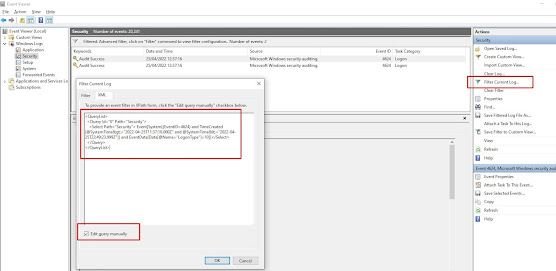
Use the following powershell script to find the last users to login to a box since a given date, in this case the 21st April 2022 at 12pm un...