Friday, 2 September 2016

How to retrieve the logged on user of a remote machine in powershell

Note: For windows 7 desktop users you’ll need to install the active directory modules for powershell by following the installation steps here
https://www.microsoft.com/en-gb/download/details.aspx?id=7887

A better version could be to filter the process for explorer.exe

Get-WmiObject -class win32_process -Filter "name = 'Explorer.exe'" -ComputerName MACHINENAME -EA "Stop" | % {$_.GetOwner().User}

Or if you wish to resolve down to the actual full person's name

Get-WmiObject -class win32_process -Filter "name = 'Explorer.exe'" -ComputerName WDUKLON-0102 -EA "Stop" | % {Get-AdUser -Identity $_.GetOwner().User | Select -Property Name}

For all logged on users though, use the following script…

 https://gallery.technet.microsoft.com/scriptcenter/d46b1f3b-36a4-4a56-951b-e37815a2df0c
function Get-LoggedOnUser {
#Requires -Version 2.0           
[CmdletBinding()]           
Param            
   (                      
    [Parameter(Mandatory=$true,
               Position=0,                         
               ValueFromPipeline=$true,           
               ValueFromPipelineByPropertyName=$true)]           
    [String[]]$ComputerName
   )#End Param

Begin           
{           
Write-Host "`n Checking Users . . . "
$i = 0           
}#Begin         
Process           
{
    $ComputerName | Foreach-object {
    $Computer = $_
    try
        {
            $processinfo = @(Get-WmiObject -class win32_process -ComputerName $Computer -EA "Stop")
                if ($processinfo)
                {   
                    $processinfo | Foreach-Object {$_.GetOwner().User} |
                    Where-Object {$_ -ne "NETWORK SERVICE" -and $_ -ne "LOCAL SERVICE" -and $_ -ne "SYSTEM"} |
                    Sort-Object -Unique |
                    ForEach-Object { New-Object psobject -Property @{Computer=$Computer;LoggedOn=$_} } |
                    Select-Object Computer,LoggedOn
                }#If
        }
    catch
        {
            "Cannot find any processes running on $computer" | Out-Host
        }
     }#Forech-object(ComputerName)      
           
}#Process
End
{

}#End
}#Get-LoggedOnUser

Friday, 19 August 2016

ASCII art with Powershell

$colors = [System.ConsoleColor]::GetValues([System.ConsoleColor]); 1..100 | % { $var= ($_ %= $colors.Length ); Write-Host $var.ToString().PadRight($var * 10, '*') -ForegroundColor $colors[$var] -BackgroundColor $colors[$var -1 ] }

image

Tuesday, 2 August 2016

Extract file version from all machines on network using powershell

cls
$computers = (Get-ADComputer -Filter "Name -like 'WDUKLON*'" | select -ExpandProperty Name)

$ErrorActionPreference = 'SilentlyContinue'

$computers | % {
    $computername = $_;
    $dllfile = (get-childitem "\\$computername\c$\Program Files (x86)\RRA\Beacon\RRA.Beacon.Recruiter.Business.dll" -ErrorAction SilentlyContinue);
    $fileversion = [System.Diagnostics.FileVersionInfo]::GetVersionInfo($dllfile).FileVersion;
    If (!$fileversion.ToString().StartsWith("4") ) {"{0}`t{1}" -f $computername, $fileversion.ToString()}
    }

N.B. RSA pack will need installing on win 7 machine https://www.microsoft.com/en-gb/download/details.aspx?id=7887

Thursday, 30 June 2016

Macro for connecting Visual Studio to windows service for debugging

Got this through today from my old colleague Kevin McConaghy,…
 
1.  Hack for service OnStart event, essentially to stall the service for long enough for the VS Extension to connect after starting it, only in debug mode and only if you send a special argument.
 
        protected override void OnStart(string[] args)
        {
#if DEBUG
            // If the "WaitForDebugger" argument is passed, wait for 15 seconds for a debugger to become attached.
            if (args.OfType<string>().Contains("WaitForDebugger"))
            {
                for (var i = 1; i <= 15; i++)
                {
                    if (Debugger.IsAttached)
                    {
                        break;
                    }
                    Thread.Sleep(1000);
                }
                // If no debugger is attached, abort attempt to start service.
                if (!Debugger.IsAttached)
                {
                    Stop();
                    return;
                }
            }
#endif
2. The vCmd script, this automates the starting of the service if it is not started, and then the connection of the debugger to the process.
using EnvDTE;
using EnvDTE80;
using System;
using System.Collections.Generic;
using System.Linq;
using System.Management;
using System.ServiceProcess;
public class C : VisualCommanderExt.ICommand
{
    public void Run(EnvDTE80.DTE2 DTE, Microsoft.VisualStudio.Shell.Package package)
    {
        var serviceName = "MessagingService";
        using(var serviceController = new ServiceController(serviceName))
        using(var serviceManagement = new ManagementObject("Win32_Service.Name='"+serviceName+"'"))
        {
            // Start service with "WaitForDebugger" parameter, if the service is stopped.
            if (serviceController.Status == ServiceControllerStatus.Stopped)
            {
                serviceController.Start(new []{"WaitForDebugger"});
            }
            // Attach debugger to process.
            var servicePath = serviceManagement.Properties["PathName"].Value.ToString().Trim('\"');
            try
            {
                var serviceProcess = DTE.Debugger.LocalProcesses.OfType<Process>().Single(x => x.Name == servicePath);
                serviceProcess.Attach();
                return;
            }
            catch(Exception ex)
            {
                System.Windows.MessageBox.Show(string.Format("Could not find process: {0}, {1}.", servicePath, ex.Message));
            }
        }
    }
}
3. The script requires the following references, added via the button.
System.Core
System.Linq
System.ServiceProcess
System.Management


Thursday, 23 June 2016

Setting up the task board in TFS

First ensure that you have set up the backlog iteration, to be one above the iteration path for your sprint items, and then check the items for your sprint iteration here

http://tfs.com:8080/tfs/DefaultCollection/TeamProjectName/_admin/_iterations

Then use this link to get to the task board

http://tfs.com:8080/tfs/DefaultCollection/TeamProjectName/_backlogs/TaskBoard/#_a=requirements

Monday, 9 May 2016

Unshelving from one branch to another in TFS


This works fine…

tfpt unshelve /migrate /source:$/MyProject/Fb3.9.8 /target:$/MyProject/Main

But put quotes round and it does NOT work

tfpt unshelve /migrate /source:"$/MyProject/Fb3.9.8" /target:"$/MyProject/Main"

Further information can be found here…

http://geekswithblogs.net/TarunArora/archive/2011/06/06/unshelve-shelveset-created-from-one-branch-to-another.aspx

Tuesday, 26 April 2016

JetBrains dotMemory not attaching = reload .NET perf counters

If you get an issue using dotMemory where it wont connect to the profiler, then run the following two commands from a .net command prompt…
unlodctr .NETFramework
lodctr C:\Windows\Inf\.NETFramework\corperfmonsymbols.ini

Friday, 22 January 2016

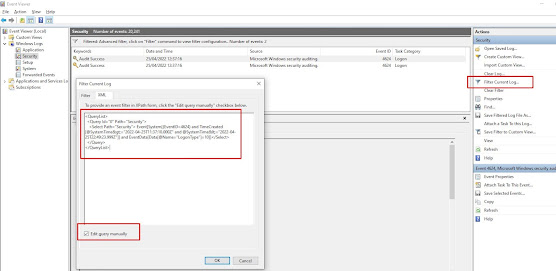
How to find the last interactive logons in Windows using PowerShell

Use the following powershell script to find the last users to login to a box since a given date, in this case the 21st April 2022 at 12pm un...