I wonder who left this endorsement on www.accidentclaims.org
Friday, 1 February 2013

Thanks Dzone!
Back when I used to blog for Conchango, someone once asked me why do I bother blogging. Well yesterday I received my free www.dzone.com bundle package, which included a nice new T-Shirt, 8GB USB memory stick, and some toys for my kids amongst other things... ALL FREE!!! - So you see sometimes in life, you do get something for nothing.

It also included print outs of a couple of dzone.com ref cards including this one that opened my eyes to HTML5 WebSockets...
http://cdn.dzone.com/sites/all/files/refcardz/rc152-010d-Websocket_2.pdf
The funniest part is the author @peterlubbers, who even has a number plate reading HTML5 in California...

Wednesday, 30 January 2013
Beginner HTML5, JavaScript, jQuery, Backbone, and CSS3 Resources
Have a look at this guy's blog post here for a great load of resources on these topics...
http://www.elijahmanor.com/2013/01/beginner-html5-javascript-jquery.html
Friday, 18 January 2013
<PRE> tags and white-space: pre style
When you need to preserve tab characters and line breaks within HTML elements other than multiline input fields, you can use the <pre> tag or the style attribute of white-space: pre.
Just noticed that there is a slight difference in using a <pre> tag and a div with the white-space: pre style attribute applied to it. As the default user agent setting for the font-family style attribute for a <pre> tag is mono

Found more of a description on this site... http://www.quirksmode.org/css/whitespace.html#t01

Use Plunkr to test it out if you like....
http://plnkr.co/edit/dqJKnD?p=preview
<!DOCTYPE html>
<html>
<head lang="en">
<meta charset="utf-8">
<title>Awesome Game</title>
<head>
<body>
<pre>Test this wer awereaw
waerwearaw
waeraw
w
</pre>
<div id='content' style="white-space:pre">Content!
waer
weraweraw
waera
waer
</div>
</body>
</html>
Thursday, 17 January 2013
Project Silk for all your HTML web application needs
A colleague of mine pointed out this white paper article that Microsoft have kindly put together, which appears to be a full overview on how to construct a web site in this day an age.
"Guidance for building cross-browser web applications with a focus on client-side interactivity. These applications take advantage of the latest web standards like HTML5, CSS3 and ECMAScript 5 along with modern web technologies such as jQuery, Internet Explorer 9, and ASP.NET MVC3"
You can also download it all in pdf format from the following link
http://www.microsoft.com/en-us/download/details.aspx?id=27290
Tuesday, 8 January 2013
Adobe Photoshop Free
http://www.adobe.com/downloads/cs2_downloads/index.html
P.S. You also will find that you get PS touch free on a Samsung Galaxy note 10.1 tablet device.
Monday, 31 December 2012
How to delete gmail from android app
Most of you would think that this is quite simple however you would be wrong it is actually very counter intuitive
- first select the emails you want to delete
- then mark them as spam
- in in the span folder swipe the email to the right to delete it forever
Friday, 28 December 2012
Javascript framework performance tester
Came across this little gem for testing the performance of javascript frameworks in your browser. Interesting to see how each browser performs...
http://jsperf.com/angular-vs-knockout-vs-ember/2
Also this is quite a good reference for all the difference frameworks that are out there at the moment to choose from
http://addyosmani.github.com/todomvc/
Performance test results for various browsers as follows...
IE 8.0 32-bit on Windows 7 64-bit
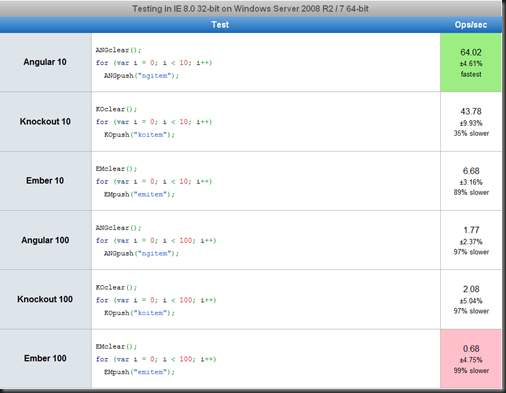
Chrome IE 9 32-bit on Windows 7 64-bit

Chrome 23.0.1271.97 32-bit on Windows 7 64-bit

http://jsperf.com/angular-vs-knockout-vs-ember/2
Also this is quite a good reference for all the difference frameworks that are out there at the moment to choose from
http://addyosmani.github.com/todomvc/
Performance test results for various browsers as follows...
IE 8.0 32-bit on Windows 7 64-bit

Chrome IE 9 32-bit on Windows 7 64-bit

Chrome 23.0.1271.97 32-bit on Windows 7 64-bit


Thursday, 13 December 2012
How to use the Translator Generator VS 2010 Extension
Installation
- Ensure you have the following installed...
a)http://www.microsoft.com/en-us/download/details.aspx?id=21835
b)http://visualstudiogallery.msdn.microsoft.com/25e4b5e9-65e4-4950-967d-5f1e6a9dcbeb/?lc=1033 - simply double click the downloaded vsix file - Install the TranslatorGenerator VSIX package by double clicking on it. You will see the following window appear, just click the Install button.
- If you have successfully installed you will see the following message...


Enabling the Translator Generator
- Open your solution in visual studio 2010
- Enable the translator generator from Tools, Guidance Package Manager, Enable / Disable Packages..., check Translator Generator option, OK

Using the Translator Generator
- Open a new Visual Studio instance after installing the package
- Right click on your target project and select Create Translator from the Translator Generator context menu option
- Click the ... buttons to choose your first and second classes, which are your source and target entities that you wish to create translator logic for
- Then click the Next button
- Now click the Map All button, this will attempt to match up similar named properties (case insensitive, and underscore characters ignored)
- You can then select properties manually in each side and click the map button to line these up as well
- Then click the finish button. Your newly created translator will end up under the Translators folder in your project.


Uninstalling
- Run the following command from a VS.NET command prompt window
VSIXInstaller.exe /U:8E53EB18-6A5C-4068-B24F-DE7147F3BB3E
- You should then see this window
- Then restart visual studio to ensure the package is completely removed from your extensions folder which is under
%userprofile%\AppData\Local\Microsoft\VisualStudio\10.0\Extensions

Monday, 3 December 2012
How to clear the Windows 7 Print Spooler
http://support.microsoft.com/kb/946737 – Method D
Run the following commands in order from a command prompt. I just stick them in a batch file called fixprint.bat under the %windir% windows folder.
net stop spooler
del %systemroot%\system32\spool\printers\*.shd
del %systemroot%\system32\spool\printers\*.spl
net start spooler
Configuring SQL Server Service Broker
Found a good step by step article here on SQL server central
http://www.sqlservercentral.com/articles/Service+Broker/67513/
At a high level these are the points to remember
To configure the service broker to send and receive messages between databases (either in local/remote instances), it needs few components in place to start the service. These are listed below.
- Enable the Service Broker on the database
- Create valid Message Types.
- Create a Contract for the conversation.
- Create Queues for the Communication.
- Create Services for the Communication.
Subscribe to:
Posts (Atom)
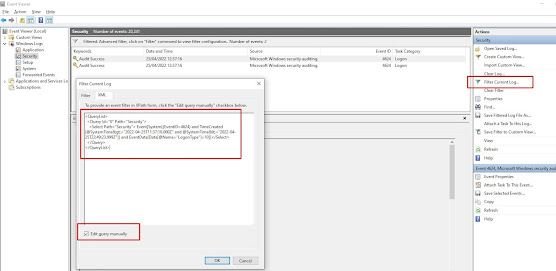
How to find the last interactive logons in Windows using PowerShell
Use the following powershell script to find the last users to login to a box since a given date, in this case the 21st April 2022 at 12pm un...
-
Quite by chance today I stumbled across a new way to learn Resharper shortcuts. In visual studio, when editing a file, tap the ctrl key thre...
-
http://www.jaguarforums.com/forum/s-type-s-type-r-supercharged-v8-15/key-fob-battery-replacement-write-up-faq-54380/ NOTE: MAKE SURE YOU DO ...

