If you're thinking of building single page applications in future, then you will need to learn the following frameworks for sure..
Wednesday, 18 July 2012


Thursday, 12 July 2012
Handy SQL for extracting creating your test data insert scripts
SET NOCOUNT ON
GO
PRINT 'Checking for the existence of this procedure'
IF (SELECT OBJECT_ID('sp_generate_inserts','P')) IS NOT NULL --means, the procedure already exists
BEGIN
PRINT 'Procedure already exists. So, dropping it'
DROP PROC sp_generate_inserts
END
GO
CREATE PROC sp_generate_inserts
(
@table_name varchar(776), -- The table/view for which the INSERT statements will be generated using the existing data
@target_table varchar(776) = NULL, -- Use this parameter to specify a different table name into which the data will be inserted
@include_column_list bit = 1, -- Use this parameter to include/ommit column list in the generated INSERT statement
@from varchar(800) = NULL, -- Use this parameter to filter the rows based on a filter condition (using WHERE)
@include_timestamp bit = 0, -- Specify 1 for this parameter, if you want to include the TIMESTAMP/ROWVERSION column's data in the INSERT statement
@debug_mode bit = 0, -- If @debug_mode is set to 1, the SQL statements constructed by this procedure will be printed for later examination
@owner varchar(64) = NULL, -- Use this parameter if you are not the owner of the table
@ommit_images bit = 0, -- Use this parameter to generate INSERT statements by omitting the 'image' columns
@ommit_identity bit = 0, -- Use this parameter to ommit the identity columns
@top int = NULL, -- Use this parameter to generate INSERT statements only for the TOP n rows
@cols_to_include varchar(8000) = NULL, -- List of columns to be included in the INSERT statement
@cols_to_exclude varchar(8000) = NULL, -- List of columns to be excluded from the INSERT statement
@disable_constraints bit = 0, -- When 1, disables foreign key constraints and enables them after the INSERT statements
@ommit_computed_cols bit = 0 -- When 1, computed columns will not be included in the INSERT statement
)
AS
BEGIN
/***********************************************************************************************************
Procedure: sp_generate_inserts (Build 22)
(Copyright © 2002 Narayana Vyas Kondreddi. All rights reserved.)
Purpose: To generate INSERT statements from existing data.
These INSERTS can be executed to regenerate the data at some other location.
This procedure is also useful to create a database setup, where in you can
script your data along with your table definitions.
Written by: Narayana Vyas Kondreddi
Acknowledgements:
Divya Kalra -- For beta testing
Mark Charsley -- For reporting a problem with scripting uniqueidentifier columns with NULL values
Artur Zeygman -- For helping me simplify a bit of code for handling non-dbo owned tables
Joris Laperre -- For reporting a regression bug in handling text/ntext columns
Tested on: SQL Server 7.0 and SQL Server 2000 and SQL Server 2005
Date created: January 17th 2001 21:52 GMT
Date modified: May 1st 2002 19:50 GMT
Email: vyaskn@hotmail.com
NOTE: This procedure may not work with tables with too many columns.
Results can be unpredictable with huge text columns or SQL Server 2000's sql_variant data types
Whenever possible, Use @include_column_list parameter to ommit column list in the INSERT statement, for better results
IMPORTANT: This procedure is not tested with internation data (Extended characters or Unicode). If needed
you might want to convert the datatypes of character variables in this procedure to their respective unicode counterparts
like nchar and nvarchar
ALSO NOTE THAT THIS PROCEDURE IS NOT UPDATED TO WORK WITH NEW DATA TYPES INTRODUCED IN SQL SERVER 2005 / YUKON
Example 1: To generate INSERT statements for table 'titles':
EXEC sp_generate_inserts 'titles'
Example 2: To ommit the column list in the INSERT statement: (Column list is included by default)
IMPORTANT: If you have too many columns, you are advised to ommit column list, as shown below,
to avoid erroneous results
EXEC sp_generate_inserts 'titles', @include_column_list = 0
Example 3: To generate INSERT statements for 'titlesCopy' table from 'titles' table:
EXEC sp_generate_inserts 'titles', 'titlesCopy'
Example 4: To generate INSERT statements for 'titles' table for only those titles
which contain the word 'Computer' in them:
NOTE: Do not complicate the FROM or WHERE clause here. It's assumed that you are good with T-SQL if you are using this parameter
EXEC sp_generate_inserts 'titles', @from = "from titles where title like '%Computer%'"
Example 5: To specify that you want to include TIMESTAMP column's data as well in the INSERT statement:
(By default TIMESTAMP column's data is not scripted)
EXEC sp_generate_inserts 'titles', @include_timestamp = 1
Example 6: To print the debug information:
EXEC sp_generate_inserts 'titles', @debug_mode = 1
Example 7: If you are not the owner of the table, use @owner parameter to specify the owner name
To use this option, you must have SELECT permissions on that table
EXEC sp_generate_inserts Nickstable, @owner = 'Nick'
Example 8: To generate INSERT statements for the rest of the columns excluding images
When using this otion, DO NOT set @include_column_list parameter to 0.
EXEC sp_generate_inserts imgtable, @ommit_images = 1
Example 9: To generate INSERT statements excluding (ommiting) IDENTITY columns:
(By default IDENTITY columns are included in the INSERT statement)
EXEC sp_generate_inserts mytable, @ommit_identity = 1
Example 10: To generate INSERT statements for the TOP 10 rows in the table:
EXEC sp_generate_inserts mytable, @top = 10
Example 11: To generate INSERT statements with only those columns you want:
EXEC sp_generate_inserts titles, @cols_to_include = "'title','title_id','au_id'"
Example 12: To generate INSERT statements by omitting certain columns:
EXEC sp_generate_inserts titles, @cols_to_exclude = "'title','title_id','au_id'"
Example 13: To avoid checking the foreign key constraints while loading data with INSERT statements:
EXEC sp_generate_inserts titles, @disable_constraints = 1
Example 14: To exclude computed columns from the INSERT statement:
EXEC sp_generate_inserts MyTable, @ommit_computed_cols = 1
***********************************************************************************************************/
SET NOCOUNT ON
--Making sure user only uses either @cols_to_include or @cols_to_exclude
IF ((@cols_to_include IS NOT NULL) AND (@cols_to_exclude IS NOT NULL))
BEGIN
RAISERROR('Use either @cols_to_include or @cols_to_exclude. Do not use both the parameters at once',16,1)
RETURN -1 --Failure. Reason: Both @cols_to_include and @cols_to_exclude parameters are specified
END
--Making sure the @cols_to_include and @cols_to_exclude parameters are receiving values in proper format
IF ((@cols_to_include IS NOT NULL) AND (PATINDEX('''%''',@cols_to_include) = 0))
BEGIN
RAISERROR('Invalid use of @cols_to_include property',16,1)
PRINT 'Specify column names surrounded by single quotes and separated by commas'
PRINT 'Eg: EXEC sp_generate_inserts titles, @cols_to_include = "''title_id'',''title''"'
RETURN -1 --Failure. Reason: Invalid use of @cols_to_include property
END
IF ((@cols_to_exclude IS NOT NULL) AND (PATINDEX('''%''',@cols_to_exclude) = 0))
BEGIN
RAISERROR('Invalid use of @cols_to_exclude property',16,1)
PRINT 'Specify column names surrounded by single quotes and separated by commas'
PRINT 'Eg: EXEC sp_generate_inserts titles, @cols_to_exclude = "''title_id'',''title''"'
RETURN -1 --Failure. Reason: Invalid use of @cols_to_exclude property
END
--Checking to see if the database name is specified along wih the table name
--Your database context should be local to the table for which you want to generate INSERT statements
--specifying the database name is not allowed
IF (PARSENAME(@table_name,3)) IS NOT NULL
BEGIN
RAISERROR('Do not specify the database name. Be in the required database and just specify the table name.',16,1)
RETURN -1 --Failure. Reason: Database name is specified along with the table name, which is not allowed
END
--Checking for the existence of 'user table' or 'view'
--This procedure is not written to work on system tables
--To script the data in system tables, just create a view on the system tables and script the view instead
IF @owner IS NULL
BEGIN
IF ((OBJECT_ID(@table_name,'U') IS NULL) AND (OBJECT_ID(@table_name,'V') IS NULL))
BEGIN
RAISERROR('User table or view not found.',16,1)
PRINT 'You may see this error, if you are not the owner of this table or view. In that case use @owner parameter to specify the owner name.'
PRINT 'Make sure you have SELECT permission on that table or view.'
RETURN -1 --Failure. Reason: There is no user table or view with this name
END
END
ELSE
BEGIN
IF NOT EXISTS (SELECT 1 FROM INFORMATION_SCHEMA.TABLES WHERE TABLE_NAME = @table_name AND (TABLE_TYPE = 'BASE TABLE' OR TABLE_TYPE = 'VIEW') AND TABLE_SCHEMA = @owner)
BEGIN
RAISERROR('User table or view not found.',16,1)
PRINT 'You may see this error, if you are not the owner of this table. In that case use @owner parameter to specify the owner name.'
PRINT 'Make sure you have SELECT permission on that table or view.'
RETURN -1 --Failure. Reason: There is no user table or view with this name
END
END
--Variable declarations
DECLARE @Column_ID int,
@Column_List varchar(8000),
@Column_Name varchar(128),
@Start_Insert varchar(786),
@Data_Type varchar(128),
@Actual_Values varchar(8000), --This is the string that will be finally executed to generate INSERT statements
@IDN varchar(128) --Will contain the IDENTITY column's name in the table
--Variable Initialization
SET @IDN = ''
SET @Column_ID = 0
SET @Column_Name = ''
SET @Column_List = ''
SET @Actual_Values = ''
IF @owner IS NULL
BEGIN
SET @Start_Insert = 'INSERT INTO ' + '[' + RTRIM(COALESCE(@target_table,@table_name)) + ']'
END
ELSE
BEGIN
SET @Start_Insert = 'INSERT ' + '[' + LTRIM(RTRIM(@owner)) + '].' + '[' + RTRIM(COALESCE(@target_table,@table_name)) + ']'
END
--To get the first column's ID
SELECT @Column_ID = MIN(ORDINAL_POSITION)
FROM INFORMATION_SCHEMA.COLUMNS (NOLOCK)
WHERE TABLE_NAME = @table_name AND
(@owner IS NULL OR TABLE_SCHEMA = @owner)
--Loop through all the columns of the table, to get the column names and their data types
WHILE @Column_ID IS NOT NULL
BEGIN
SELECT @Column_Name = QUOTENAME(COLUMN_NAME),
@Data_Type = DATA_TYPE
FROM INFORMATION_SCHEMA.COLUMNS (NOLOCK)
WHERE ORDINAL_POSITION = @Column_ID AND
TABLE_NAME = @table_name AND
(@owner IS NULL OR TABLE_SCHEMA = @owner)
IF @cols_to_include IS NOT NULL --Selecting only user specified columns
BEGIN
IF CHARINDEX( '''' + SUBSTRING(@Column_Name,2,LEN(@Column_Name)-2) + '''',@cols_to_include) = 0
BEGIN
GOTO SKIP_LOOP
END
END
IF @cols_to_exclude IS NOT NULL --Selecting only user specified columns
BEGIN
IF CHARINDEX( '''' + SUBSTRING(@Column_Name,2,LEN(@Column_Name)-2) + '''',@cols_to_exclude) <> 0
BEGIN
GOTO SKIP_LOOP
END
END
--Making sure to output SET IDENTITY_INSERT ON/OFF in case the table has an IDENTITY column
IF (SELECT COLUMNPROPERTY( OBJECT_ID(QUOTENAME(COALESCE(@owner,USER_NAME())) + '.' + @table_name),SUBSTRING(@Column_Name,2,LEN(@Column_Name) - 2),'IsIdentity')) = 1
BEGIN
IF @ommit_identity = 0 --Determing whether to include or exclude the IDENTITY column
SET @IDN = @Column_Name
ELSE
GOTO SKIP_LOOP
END
--Making sure whether to output computed columns or not
IF @ommit_computed_cols = 1
BEGIN
IF (SELECT COLUMNPROPERTY( OBJECT_ID(QUOTENAME(COALESCE(@owner,USER_NAME())) + '.' + @table_name),SUBSTRING(@Column_Name,2,LEN(@Column_Name) - 2),'IsComputed')) = 1
BEGIN
GOTO SKIP_LOOP
END
END
--Tables with columns of IMAGE data type are not supported for obvious reasons
IF(@Data_Type in ('image'))
BEGIN
IF (@ommit_images = 0)
BEGIN
RAISERROR('Tables with image columns are not supported.',16,1)
PRINT 'Use @ommit_images = 1 parameter to generate INSERTs for the rest of the columns.'
PRINT 'DO NOT ommit Column List in the INSERT statements. If you ommit column list using @include_column_list=0, the generated INSERTs will fail.'
RETURN -1 --Failure. Reason: There is a column with image data type
END
ELSE
BEGIN
GOTO SKIP_LOOP
END
END
--Determining the data type of the column and depending on the data type, the VALUES part of
--the INSERT statement is generated. Care is taken to handle columns with NULL values. Also
--making sure, not to lose any data from flot, real, money, smallmomey, datetime columns
SET @Actual_Values = @Actual_Values +
CASE
WHEN @Data_Type IN ('char','varchar','nchar','nvarchar')
THEN
'COALESCE('''''''' + REPLACE(RTRIM(' + @Column_Name + '),'''''''','''''''''''')+'''''''',''NULL'')'
WHEN @Data_Type IN ('datetime','smalldatetime')
THEN
'COALESCE('''''''' + RTRIM(CONVERT(char,' + @Column_Name + ',109))+'''''''',''NULL'')'
WHEN @Data_Type IN ('uniqueidentifier')
THEN
'COALESCE('''''''' + REPLACE(CONVERT(char(255),RTRIM(' + @Column_Name + ')),'''''''','''''''''''')+'''''''',''NULL'')'
WHEN @Data_Type IN ('text','ntext')
THEN
'COALESCE('''''''' + REPLACE(CONVERT(char(8000),' + @Column_Name + '),'''''''','''''''''''')+'''''''',''NULL'')'
WHEN @Data_Type IN ('binary','varbinary')
THEN
'COALESCE(RTRIM(CONVERT(char,' + 'CONVERT(int,' + @Column_Name + '))),''NULL'')'
WHEN @Data_Type IN ('timestamp','rowversion')
THEN
CASE
WHEN @include_timestamp = 0
THEN
'''DEFAULT'''
ELSE
'COALESCE(RTRIM(CONVERT(char,' + 'CONVERT(int,' + @Column_Name + '))),''NULL'')'
END
WHEN @Data_Type IN ('float','real','money','smallmoney')
THEN
'COALESCE(LTRIM(RTRIM(' + 'CONVERT(char, ' + @Column_Name + ',2)' + ')),''NULL'')'
ELSE
'COALESCE(LTRIM(RTRIM(' + 'CONVERT(char, ' + @Column_Name + ')' + ')),''NULL'')'
END + '+' + ''',''' + ' + '
--Generating the column list for the INSERT statement
SET @Column_List = @Column_List + @Column_Name + ','
SKIP_LOOP: --The label used in GOTO
SELECT @Column_ID = MIN(ORDINAL_POSITION)
FROM INFORMATION_SCHEMA.COLUMNS (NOLOCK)
WHERE TABLE_NAME = @table_name AND
ORDINAL_POSITION > @Column_ID AND
(@owner IS NULL OR TABLE_SCHEMA = @owner)
--Loop ends here!
END
--To get rid of the extra characters that got concatenated during the last run through the loop
SET @Column_List = LEFT(@Column_List,len(@Column_List) - 1)
SET @Actual_Values = LEFT(@Actual_Values,len(@Actual_Values) - 6)
IF LTRIM(@Column_List) = ''
BEGIN
RAISERROR('No columns to select. There should at least be one column to generate the output',16,1)
RETURN -1 --Failure. Reason: Looks like all the columns are ommitted using the @cols_to_exclude parameter
END
--Forming the final string that will be executed, to output the INSERT statements
IF (@include_column_list <> 0)
BEGIN
SET @Actual_Values =
'SELECT ' +
CASE WHEN @top IS NULL OR @top < 0 THEN '' ELSE ' TOP ' + LTRIM(STR(@top)) + ' ' END +
'''' + RTRIM(@Start_Insert) +
' ''+' + '''(' + RTRIM(@Column_List) + '''+' + ''')''' +
' +''VALUES(''+ ' + @Actual_Values + '+'')''' + ' ' +
COALESCE(@from,' FROM ' + CASE WHEN @owner IS NULL THEN '' ELSE '[' + LTRIM(RTRIM(@owner)) + '].' END + '[' + rtrim(@table_name) + ']' + '(NOLOCK)')
END
ELSE IF (@include_column_list = 0)
BEGIN
SET @Actual_Values =
'SELECT ' +
CASE WHEN @top IS NULL OR @top < 0 THEN '' ELSE ' TOP ' + LTRIM(STR(@top)) + ' ' END +
'''' + RTRIM(@Start_Insert) +
' '' +''VALUES(''+ ' + @Actual_Values + '+'')''' + ' ' +
COALESCE(@from,' FROM ' + CASE WHEN @owner IS NULL THEN '' ELSE '[' + LTRIM(RTRIM(@owner)) + '].' END + '[' + rtrim(@table_name) + ']' + '(NOLOCK)')
END
--Determining whether to ouput any debug information
IF @debug_mode =1
BEGIN
PRINT '/*****START OF DEBUG INFORMATION*****'
PRINT 'Beginning of the INSERT statement:'
PRINT @Start_Insert
PRINT ''
PRINT 'The column list:'
PRINT @Column_List
PRINT ''
PRINT 'The SELECT statement executed to generate the INSERTs'
PRINT @Actual_Values
PRINT ''
PRINT '*****END OF DEBUG INFORMATION*****/'
PRINT ''
END
PRINT '--INSERTs generated by ''sp_generate_inserts'' stored procedure written by Vyas'
PRINT '--Build number: 22'
PRINT '--Problems/Suggestions? Contact Vyas @ vyaskn@hotmail.com'
PRINT '--http://vyaskn.tripod.com'
PRINT ''
PRINT 'SET NOCOUNT ON'
PRINT ''
--Determining whether to print IDENTITY_INSERT or not
IF (@IDN <> '')
BEGIN
PRINT 'SET IDENTITY_INSERT ' + QUOTENAME(COALESCE(@owner,USER_NAME())) + '.' + QUOTENAME(@table_name) + ' ON'
PRINT 'GO'
PRINT ''
END
IF @disable_constraints = 1 AND (OBJECT_ID(QUOTENAME(COALESCE(@owner,USER_NAME())) + '.' + @table_name, 'U') IS NOT NULL)
BEGIN
IF @owner IS NULL
BEGIN
SELECT 'ALTER TABLE ' + QUOTENAME(COALESCE(@target_table, @table_name)) + ' NOCHECK CONSTRAINT ALL' AS '--Code to disable constraints temporarily'
END
ELSE
BEGIN
SELECT 'ALTER TABLE ' + QUOTENAME(@owner) + '.' + QUOTENAME(COALESCE(@target_table, @table_name)) + ' NOCHECK CONSTRAINT ALL' AS '--Code to disable constraints temporarily'
END
PRINT 'GO'
END
PRINT ''
PRINT 'PRINT ''Inserting values into ' + '[' + RTRIM(COALESCE(@target_table,@table_name)) + ']' + ''''
--All the hard work pays off here!!! You'll get your INSERT statements, when the next line executes!
EXEC (@Actual_Values)
PRINT 'PRINT ''Done'''
PRINT ''
IF @disable_constraints = 1 AND (OBJECT_ID(QUOTENAME(COALESCE(@owner,USER_NAME())) + '.' + @table_name, 'U') IS NOT NULL)
BEGIN
IF @owner IS NULL
BEGIN
SELECT 'ALTER TABLE ' + QUOTENAME(COALESCE(@target_table, @table_name)) + ' CHECK CONSTRAINT ALL' AS '--Code to enable the previously disabled constraints'
END
ELSE
BEGIN
SELECT 'ALTER TABLE ' + QUOTENAME(@owner) + '.' + QUOTENAME(COALESCE(@target_table, @table_name)) + ' CHECK CONSTRAINT ALL' AS '--Code to enable the previously disabled constraints'
END
PRINT 'GO'
END
PRINT ''
IF (@IDN <> '')
BEGIN
PRINT 'SET IDENTITY_INSERT ' + QUOTENAME(COALESCE(@owner,USER_NAME())) + '.' + QUOTENAME(@table_name) + ' OFF'
PRINT 'GO'
END
PRINT 'SET NOCOUNT OFF'
SET NOCOUNT OFF
RETURN 0 --Success. We are done!
END
GO
PRINT 'Created the procedure'
GO
--Mark procedure as system object
EXEC sys.sp_MS_marksystemobject sp_generate_inserts
GO
PRINT 'Granting EXECUTE permission on sp_generate_inserts to all users'
GRANT EXEC ON sp_generate_inserts TO public
SET NOCOUNT OFF
GO
PRINT 'Done'
Monday, 9 July 2012
Knockout.js learning
I've come across this great site for helping you to get to grips with the basics of creating some excellent user interfaces in javascript and HTML5.

If anything, it's great just for using the editor for quick checking of HTML in a preview mode using the Run functionality on the left hand side...

Thursday, 5 July 2012
User Agent switcher extension for Google Chrome for mobile development
In case you have Google chrome, and are doing device based HTML rendering, this extension to chrome is very useful. Allows you to switch your desktop browser into behaving like an iPhone...
https://chrome.google.com/webstore/detail/djflhoibgkdhkhhcedjiklpkjnoahfmg?hl=en-US&gl=US

Here Chrome is looking like iPhone4 for twitter.com

Tuesday, 3 July 2012
How to set the physical path of a virtual directory from the command line using appcmd.exe
>\Windows\System32\inetsrv\appcmd.exe set vdir "Default Web Site/MyAppName/" -physicalPath:"C:\MyAppPath"
For more information relating to appcmd.exe and it's various usages, see this link here...
http://learn.iis.net/page.aspx/114/getting-started-with-appcmdexe/
Also to discover which app pool workerprocess is which you can use the following command
%systemroot%\system32\inetsrv\appcmd.exe list WP
or just look at your task manager with the command line column expanded for the w3wp.exe process

Monday, 2 July 2012
Spot the imposter!
Clearly this guy did not get much coverage on the news, although he's my absolute hero, for being able to by pass all the security and get himself on to the platform, with champagne bottle in hand, as Spain lifted the 2012 European cup last night on the winners podium...
http://youtu.be/p5iKNOeHtXo?hd=1&t=54s

Watch how he gets shepherded away after they realise he's an imposter. Well funny!
Friday, 29 June 2012
Building Single Page Apps for desktop, mobile and tablet with ASP.NET MVC 4
Great video here from Steve Sanderson on building single page web apps for desktop mobile and tablet with MVC 4
http://channel9.msdn.com/Events/TechDays/Techdays-2012-the-Netherlands/2159?format=html5
More at
Monday, 25 June 2012
Using Apache benchmark to load test your web site
You can download the apache web server, then simply look inside the zip file for ab.exe.
E.g. to load test your site with 10 concurrent requests use the following command line...
>ab.exe -n 10 -c 10 http://localhost/mywebsite
For more information see 8.15mins into this video link...
http://channel9.msdn.com/Events/TechDays/Techdays-2012-the-Netherlands/2287
Tuesday, 12 June 2012
Thursday, 31 May 2012
How to gain detailed system information about your Windows 7 PC
1. Open the Performance Information and Tools option from control panel (or just hit [Windows Key] + [Break] together).
2. Click on the View and print detailed performance and system information link

3. Now you will see the following information, that you can event print out easily. This is how I found the model number for my laptop anyway...

4. For even more detailed information just run C:\Windows\System32\msinfo32.exe - or launch it from the msconfig.exe, Tools tab

Tuesday, 29 May 2012
JQuery event debugging
http://james.padolsey.com/javascript/debug-jquery-events-with-listhandlers/
CODE
Here’s a useful debugging plugin for jQuery. It will list the handler/’s of any event bound to any element:
/ UPDATED -> NOW WORKS WITH jQuery 1.3.1
$.fn.listHandlers = function(events, outputFunction) {
    return this.each(function(i){
        var elem = this,
            dEvents = $(this).data('events');
        if (!dEvents) {return;}
        $.each(dEvents, function(name, handler){
            if((new RegExp('^(' + (events === '*' ? '.+' : events.replace(',','|').replace(/^on/i,'')) + ')$' ,'i')).test(name)) {
               $.each(handler, function(i,handler){
                   outputFunction(elem, '\n' + i + ': [' + name + '] : ' + handler );
               });
           }
        });
    });
};
USAGE
It’s pretty simple to use, you can specify the elements (as you usually would, via a selector), the events to be listed and the output function to which the plugin will feed the data.
If you’re using firebug then it’s best to use either the console.log function or console.info.
// List all onclick handlers of all anchor elements:
$('a').listHandlers('onclick', console.info);   // List all handlers for all events of all elements:
$('*').listHandlers('*', console.info);   // Write a custom output function:
$('#whatever').listHandlers('click',function(element,data){
    $('body').prepend('<br />' + element.nodeName + ': <br /><pre>' + data + '<\/pre>');
});
Note, this will only work if you’ve used jQuery’s native event registration methods, e.g.$(elem).click() / $(elem).bind('click').

Subscribe to:
Posts (Atom)
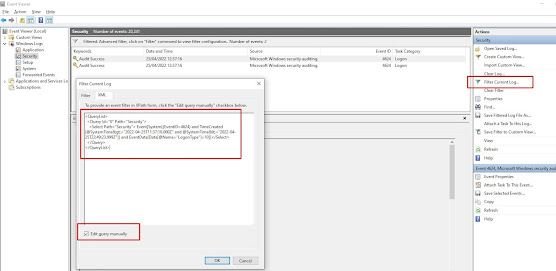
How to find the last interactive logons in Windows using PowerShell
Use the following powershell script to find the last users to login to a box since a given date, in this case the 21st April 2022 at 12pm un...
-
Quite by chance today I stumbled across a new way to learn Resharper shortcuts. In visual studio, when editing a file, tap the ctrl key thre...
-
http://www.jaguarforums.com/forum/s-type-s-type-r-supercharged-v8-15/key-fob-battery-replacement-write-up-faq-54380/ NOTE: MAKE SURE YOU DO ...

