Monday, 19 May 2014

Friday, 16 May 2014
Unshelving just the items you want in VS2013
Say you have a large shelve set and you only want to unshelve certain file types from that shelve set, like the project references changes you've made.
- Find your shelve set
- Open it in VS2013
- In the filter box type *.csproj
- Select all in the results and then right click
- Choose Exclude unselected from the context menu
- Unshelve the resulting items, which should just be the csproj files.


Using Git with Codeplex
Using Git with CodePlex
Git is a distributed version control system that is popular for open source projects. To learn more about how to use Git, the Pro Git site is a great reference. The following is a step-by-step guide to get started using Git for your CodePlex projects.
Step 1: Create your CodePlex project
Log-in to CodePlex and create a project. When selecting the source control, pick Git.
Once your project is created, click on the Source Control tab. Click the “Clone” action link to bring up connection details:
The clone URL is already selected and you can just type ctrl-C to copy the URL. We’ll be using this later.
Step 2: Set up Git
Download and install the latest Git tools for your operating system:
For the remainder of the guide, we’ll assume that you’re on a Windows system for screenshots.
After you’ve installed Git, you’ll want to provide Git with a username. Git uses this information to keep track of commit history, and CodePlex uses this to match commit history with CodePlex users. To do so, open the Git command line (Git Bash if you chose the default installation options for Git on Windows) and type the following command:
git config --global user.name "CodePlexUsername"
Step 3: Clone the repository
Next, you’ll want to set up your repository on your local machine by cloning the repository on CodePlex. In the Git command line, change the directory to a folder where you want to store the source code of your project and then type the following git command:
git clone https://CloneUrl NameOfFolder
where CloneUrl is the Clone URL you noted in Step 1, and NameOfFolder is the name of the folder where you want the source code to be stored. For example:
git clone https://git01.codeplex.com/plastikdreamgit PlastikDreamGit
Since you haven’t yet published your project, you’ll have to enter your CodePlex username and password. Because your repository is empty, you’ll get a warning message, but that’s fine.
Step 4: Push to CodePlex
Go to your newly created directory, and add your source code. Stage your changes using git add. For example, let’s say you add a readme file to your directory:
cd PlastikDreamGit
notepad readme.txt
git add readme.txt
Commit your changes with a commit message:
git commit -m "my first commit to CodePlex”
Push your changes back up to CodePlex.
git push origin master
Type in your CodePlex username and password when prompted.
Visit your source code history on the project page and verify that your changes have been pushed by browsing to the source code tab.
Thursday, 15 May 2014
Clip.exe and other sysinternals tools
Some brilliant little utilities talked about on the sysinternals session from MS TechEd 2014 here
http://channel9.msdn.com/Events/TechEd/NorthAmerica/2014/DCIM-B340#fbid=
Also check out https://www.virustotal.com/ which has integration into the latest version of sysinternals process explorer. Latest version can be downloaded from http://live.sysinternals.com. Virus total is a good way of using multiple virus scanners rather than just one to check files that you aren't sure about.
Had never heard of clip.exe before… (built into windows by default as well).
C:\Dev\RussellReynolds2010\Main\Solutions\Scripts>clip /?
CLIP
Description:
Redirects output of command line tools to the Windows clipboard.
This text output can then be pasted into other programs.
Parameter List:
/? Displays this help message.
Examples:
DIR | CLIP Places a copy of the current directory
listing into the Windows clipboard.
CLIP < README.TXT Places a copy of the text from readme.txt
on to the Windows clipboard.
More useful tools are:
- DU.exe - disk usage check : e.g.
du -ct | clip.exe - RU.exe - registry usage check : e.g.
ru -ct -l 3 "HKEY_LOCAL_MACHINE\SOFTWARE\Wow6432Node"

Friday, 2 May 2014
WPF binding to static property
Just so I don't forget again, here's how it's done...
xmlns:ValueConverters="clr-namespace:ValueConverters;assembly=Controls"
xmlns:Services="clr-namespace:Infrastructure.Interface.Services;assembly=Infrastructure.Interface"
...
<ValueConverters:BooleanToVisibilityConverter2 x:Key="booleanToVisibilityConverter2" />
</ResourceDictionary>
</UserControl.Resources>
...
<StackPanel x:Name="MyStackPanel"
Orientation="Vertical"
Visibility="{Binding Source={x:Static Services:UserPreferencesService.Instance}, Path=UseWebAssignment, Converter={StaticResource booleanToVisibilityConverter2}, ConverterParameter=true}">
Monday, 7 April 2014
Ninject cheat sheet
A little cheat sheet for how to do things with Ninject that made implementing super-simple:
http://lukewickstead.wordpress.com/2013/01/18/ninject-cheat-sheet/
Wednesday, 26 March 2014
How to restore orphaned users in TSQL after database restore
Use the following script
USE [master]
SET NOCOUNT ON;
-- Create a temp table to hold orphaned accounts
if OBJECT_ID('tempdb..#Orphans') is not NULL DROP TABLE #Orphans
CREATE TABLE #Orphans (
ID INT NOT NULL IDENTITY,
DBName NVARCHAR(MAX) DEFAULT NULL,
Username NVARCHAR(MAX),
userSID NVARCHAR(MAX)
)
-- For each database get orphaned accounts
EXEC sp_MSforeachdb 'use [?]; insert into #Orphans (Username,UserSID) EXEC sp_change_users_login ''REPORT''; update #Orphans SET dbname = ''?'' where dbname is NULL'
-- Remove DBs that are not ONLINE or that are READ_ONLY as we can't alter them.
DELETE FROM #Orphans WHERE NOT [DBName] IN
(
SELECT name
FROM sys.databases
WHERE state_desc = 'ONLINE' AND is_read_only = 0 -- Databases that are ONLINE and NOT Read_Only
)
-- Loop through all remaining orphans and attempt to un-orphan them
DECLARE @CurRow INT = 1
DECLARE @EndRow INT = (SELECT MAX(ID) FROM #Orphans)
DECLARE @SQLCmd NVARCHAR(MAX)
WHILE @CurRow <= @EndRow
BEGIN
SET @SQLCmd = (SELECT 'USE [' + DBName + ']; EXEC sp_change_users_login ''UPDATE_ONE'', ''' + Username + ''', ''' + username + ''';' FROM #Orphans WHERE ID = @CurRow)
SET @CurRow = @CurRow + 1
PRINT @SQLCmd
EXECUTE (@SQLCmd) -- re associate the login with the user account
END
-- Drop temp table holding orphaned accounts
if OBJECT_ID('tempdb..#Orphans') is not NULL DROP TABLE #Orphans
Wednesday, 12 March 2014
How to run a SQL Query across multiple databases with one query
In SQL Server management studio, using, View, Registered Servers (Ctrl+Alt+G) set up the servers that you want to execute the same query across all servers for, right click the group, select new query. Then when you execute the query, the results will come back with the first column showing you the database instance that that row came from.

Monday, 10 March 2014
How to tell what's trending on StackOverflow
Use the following link to see what kind of activity is taking place on Stack Overflow for your favourite language or topic of choice.
http://hewgill.com/~greg/stackoverflow/stack_overflow/tags/#!c%23+java+f%23+html+c

Wednesday, 5 March 2014
How to name the tabs in an SSRS report exported to Excel
Quite simply, use the PageName property.
For more information on how to do this using expressions for each page group, see here...
http://blogs.msdn.com/b/robertbruckner/archive/2010/05/16/report-design-naming-excel-worksheets.aspx
How to tell if a machine is a virtual machine in Windows
Two methods
1. Start, Run..., cmd.exe, systeminfo.exe, then search for system manufacturer, and if virtual it will be listed as follows :-
If this is a VMware virtual machine, result should be:
System Manufacturer: VMware, Inc.
System Model: VMware Virtual Platform
If this is a Hyper V or a Microsoft Virtual PC machine the result should be like this:
System Manufacturer: Microsoft Corporation
System Model: Virtual Machine
2. Start, Run..., msinfo32.exe - basically a graphical user interface showing much the same information as you get from method 1.

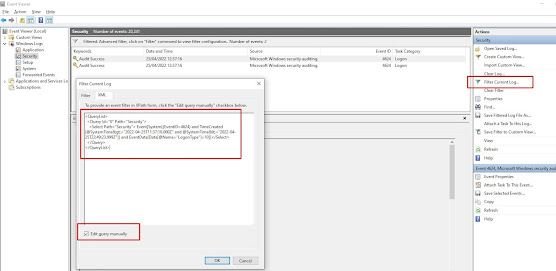
How to find the last interactive logons in Windows using PowerShell
Use the following powershell script to find the last users to login to a box since a given date, in this case the 21st April 2022 at 12pm un...
-
Quite by chance today I stumbled across a new way to learn Resharper shortcuts. In visual studio, when editing a file, tap the ctrl key thre...
-
http://www.jaguarforums.com/forum/s-type-s-type-r-supercharged-v8-15/key-fob-battery-replacement-write-up-faq-54380/ NOTE: MAKE SURE YOU DO ...

